Uneven Battery Usage in 580EXII

beckstoy

Take The Shot, Man!
Canon Rumors Premium
Mar 26, 2012
185
2
6,456
Las Vegas, NV
www.puretouchphotography.com
Wondering how many of you have seen this: Using rechargables in my 580EXII. Also use a few Yongnuo's (YN560III). The Canon, however, drains 1 of the 4 batteries MUCH faster, however, and I've started to see poor performance from that battery over time. The Yongnuo's don't ever do this.

I noticed the problem when I started putting the four batteries into my hi-dollar charger/discharger and the amount of remaining charge was always extremely lopsided when compared with the other batteries from the same flash. Seems like a very uneven draw. Hmmm...

Like I said, Canon only. Yougnuo's don't show this. Ever.

Thoughts? This actually worries me and I'm less likely to buy another Canon flash if this is common.

TIA!
 
Try taking that battery our of the rotation. The flash is powered by all 4 batteries in series so the current drain should pass through all 4 batteries. You can check each battery's voltage before putting them into a charger. Got a voltmeter?
 
Upvote 0
Dear Friend , Tia.
Sorry to hear that, But I have no problem about Canon Flashes and 3rd. MFG.= But I use the Best Recharged Batteries from Sanyo, Eneloop for past 10 years and very happy about these Eneloop.
Surapon

http://www.amazon.com/Sanyo-Eneloop-Charger-Rechargeable-Batteries/dp/B003VLAEPQ/ref=pd_sxp_f_pt
 

Attachments

  • B-1.jpg
    B-1.jpg
    662 KB · Views: 260
  • B-2.jpg
    B-2.jpg
    1.1 MB · Views: 266
  • B-3.jpg
    B-3.jpg
    1.1 MB · Views: 225
Upvote 0
tiger82 said:
Try taking that battery our of the rotation. The flash is powered by all 4 batteries in series so the current drain should pass through all 4 batteries. You can check each battery's voltage before putting them into a charger. Got a voltmeter?

Yeah, I've used a voltmeter, and it seems okay after I've cycled it once after this weirdness. Then, I used it in my Yongous and it performed perfectly. Then, right after that, cycled/charged and back into the Canon with the same bad result.
 
Upvote 0
surapon said:
Dear Friend , Tia.
Sorry to hear that, But I have no problem about Canon Flashes and 3rd. MFG.= But I use the Best Recharged Batteries from Sanyo, Eneloop for past 10 years and very happy about these Eneloop.
Surapon

http://www.amazon.com/Sanyo-Eneloop-Charger-Rechargeable-Batteries/dp/B003VLAEPQ/ref=pd_sxp_f_pt

Thank you Surapon, sir!

I use the same batteries. I didn't buy anything cheap (Enloops all the way). I wonder if I got a dud. I've got about 24 Enloops in rotation, and this has happened twice with different batteries each time, only while using my Canon flash.


Thank you for the response! I know I've got a good thread going if the Great Surapon replies. =)
 
Upvote 0
I have never had an issue like that with countless Canon flashes from 199A's and 533G's to 600's and battery packs. I did have draining issues with a Yongnuo YN-E3-RT, though not with their RF-602's.

I wouldn't worry about buying Canon flashes in the future, indeed I'd be more mindful about third party flashes battery use, though the truth is I wouldn't worry about them either, they are only batteries after all.
 
Upvote 0
The batteries are in series and get used equally, but there are some possibilities.

1. A bad battery. Remove the bad one. This would be a 99% + probability

2. Bad battery charger not fully charging batteries.

3. Current leakage in the battery compartment or related bus bars of the flash that affects only one battery. Look for any contaminants.

4. Excessive heat in the flash right next to one cell that is causing a problem with it.

That's all that immediately comes to mind.
 
Upvote 0
Mt Spokane Photography said:
The batteries are in series and get used equally, but there are some possibilities.

1. A bad battery. Remove the bad one. This would be a 99% + probability

2. Bad battery charger not fully charging batteries.

3. Current leakage in the battery compartment or related bus bars of the flash that affects only one battery. Look for any contaminants.

4. Excessive heat in the flash right next to one cell that is causing a problem with it.

That's all that immediately comes to mind.

Yep, I agree with the above suggestions, esp the ones I put in bold. Clean those contacts with a pencil eraser. But don't grind/wear off the protective layer or the underlying copper/metal will oxidize/rust rapidly. I would also try a different charger just for grins.

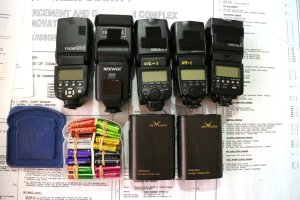
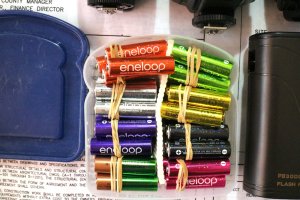
And I love seeing how Surapon does things! If carrying 2 extra sets of batteries is good, carrying 10 sets in a handy sandwich container is better (and heavier)! I sense a theme in Mr. Surapon's strategy, if it can be made to be heavier to carry, he's gonna do it! :D I think Mr. Surapon would walk us all into the ground if we tried to keep up with him and his gear!! (And I hiked 90 miles at Philmont this summer!)
 
Upvote 0
Mt Spokane Photography said:
The batteries are in series and get used equally, but there are some possibilities.

1. A bad battery. Remove the bad one. This would be a 99% + probability

2. Bad battery charger not fully charging batteries.

3. Current leakage in the battery compartment or related bus bars of the flash that affects only one battery. Look for any contaminants.

4. Excessive heat in the flash right next to one cell that is causing a problem with it.

That's all that immediately comes to mind.

I agree with the #1.
 
Upvote 0
Mt Spokane Photography said:
The batteries are in series and get used equally, but there are some possibilities.

1. A bad battery. Remove the bad one. This would be a 99% + probability

2. Bad battery charger not fully charging batteries.

3. Current leakage in the battery compartment or related bus bars of the flash that affects only one battery. Look for any contaminants.

4. Excessive heat in the flash right next to one cell that is causing a problem with it.

That's all that immediately comes to mind.

+1
 
Upvote 0