
You are using an out of date browser. It may not display this or other websites correctly.
You should upgrade or use an alternative browser.
You should upgrade or use an alternative browser.
what do you want to see 7D Mark III
- Thread starter RGF
- Start date
gekko said:haggie said:gekko said:zim said:Just the one in the middle, doesn't really count as 'linked'
All AF points can be used for that if you set the correct metering mode, both according to the user manual and my testing. I use it all the time while photographing birds.
gekko, can you tell me where in the Manual this is described for random AF-points?
Have a look in the table at the bottom of page 203.
Thanks for your reply, gekko.
The page you refer to describes 'AE Lock'. I have seen that part when I read the Manual after buying the 80D, but discarded it as of no use for photography of airplanes or other (fast) moving subjects. AE Lock means the exposure is locked to whatever light levels are measures at the moment the "*"-button is pressed and after that does not adapt if light levels change due to changing light levels e.g. as a result of following a bird.
Photographing BIF as you wrote, is even more challenging than aircraft as a result of often faster changes in light levels of the background that changes.
So, can you explain how you use this in your photography?
I am very interested to find out how you achieve this.
P.S. I do not want to 'hijack' this thread, but there is some relation with the 7D Mk III's features, so I hope it is okay to ask this follow-up question.
Upvote
0
Not much to it: use Evaluative Metering + AI Servo and shoot as you normally would. The camera will set the exposure based on the focus points in use. Keeping the shutter button half pressed and tracking your target keeps the exposure updated as the focus points change. No need to use AE Lock.
Upvote
0
gekko said:Not much to it: use Evaluative Metering + AI Servo and shoot as you normally would. The camera will set the exposure based on the focus points in use. Keeping the shutter button half pressed and tracking your target keeps the exposure updated as the focus points change. No need to use AE Lock.
Thanks again for your swift reply, gekko.
You wrote "No need to use AE Lock". I will surely try this.
I do not understand why the table at page 203 that apparently describes this is called "AE Lock Effects" and why it is in the paragraph called "AE Lock" instead of somewhere under the paragraphs of exposure and/or AF.
Upvote
0
Remove the low-pass filter. The 5DSR gives so much sharper images cropped to the same size. That and improved AF would be enough for me to upgrade.
+1 but I'd like a tilty flippy too. Possibly 24MP without the AA filter would be ideal.
Upvote
0

Here's a thought experiment about flip screens. How would a flip-out screen fit on the 7DIII, if implemented? I see the challenge not just in the weathersealing/durability as Canon have always claimed, but in the displacement of no less than 5 buttons on the left hand side. They could make the screen up/down tilt only, such as the Nikon D850.
I think they would have to either rearrange the buttons to be more like the 6D (and killing the control continuity with the 5D line) Or they would need to create a VERY thin bezel on the flippy screen, and put the buttons above and below the hinge mechanism on the left. I also see space to move the trash button below the dial.
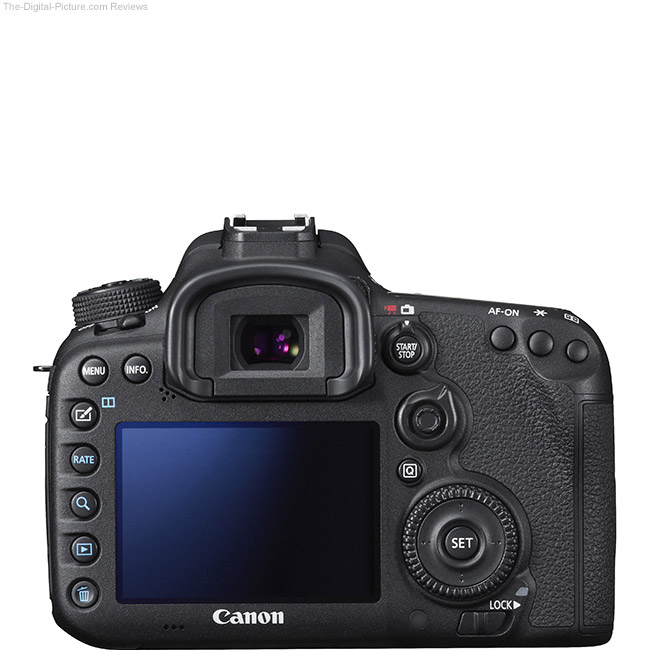
I think they would have to either rearrange the buttons to be more like the 6D (and killing the control continuity with the 5D line) Or they would need to create a VERY thin bezel on the flippy screen, and put the buttons above and below the hinge mechanism on the left. I also see space to move the trash button below the dial.
Upvote
0
gekko said:Not much to it: use Evaluative Metering + AI Servo and shoot as you normally would. The camera will set the exposure based on the focus points in use. Keeping the shutter button half pressed and tracking your target keeps the exposure updated as the focus points change. No need to use AE Lock.
Biasing the multi zone meter to the active focus point, is not the same thing as spot metering off the active focus point. What you're describing instructs the multi zone metering algorithm (evaluative in Canon's case) to give extra weight to what you've told it is the subject.
Spot metering means "give me a reading to make whatever is under this area my neutral gray tone"
Personally I don't get the fascination people have with that feature, but still, not the same.
Upvote
0

tomscott
Photographer & Graphic Designer
jdavidse said:Here's a thought experiment about flip screens. How would a flip-out screen fit on the 7DIII, if implemented? I see the challenge not just in the weathersealing/durability as Canon have always claimed, but in the displacement of no less than 5 buttons on the left hand side. They could make the screen up/down tilt only, such as the Nikon D850.
I think they would have to either rearrange the buttons to be more like the 6D (and killing the control continuity with the 5D line) Or they would need to create a VERY thin bezel on the flippy screen, and put the buttons above and below the hinge mechanism on the left. I also see space to move the trash button below the dial.
The only buttons that I use on the left are the zoom, playback and trash button. Having a dedicated rate button, direct print button are just wasted imo, like they needed to fill them with something. Never used them ever, especially when sometimes you rate and bridge or lightroom doesn't pick the rate up. Sometimes just because they have been there for a long time doesnt mean they deserve to be there. They could also be modified to work differently per application so they do one thing in playback and another in shooting.
I wouldnt mind the zoom button being the set or the AF selection point button like it used to be in the older cameras. (while in playback)
I think a tiltable (like the 850) is feasable and sufficient. The camera is too heavy to be a selfy/vlogging camera and the target audience would never use it for this its more down low up high so a 180deg would be fine and a lot easier to implement.
Upvote
0
unfocused
Photos/Photo Book Reviews: www.thecuriouseye.com
tomscott said:The only buttons that I use on the left are the zoom, playback and trash button. Having a dedicated rate button, direct print button are just wasted imo...
This illustrates the problem with change. I never use the trash button, but I must have a rate button. When shooting sports I often go through the last sequence and quickly mark the images that are possible keepers. During halftime, timeouts or after the game I often scroll through marking shots. Since it's not hard to shoot several thousand frames during a sporting event, it's a huge time saver to have a few shots already selected.
Frankly, while I can see the advantages of a flip screen and I don't believe for a second that durability has anything to do with Canon not putting them on the 7, 5 and 1 series -- just superstition on the part of photographers – I would forgo a tilt screen if it means rearranging the back of the body.
I strongly suspect that Canon has surveyed photographers and found that most pros will say "don't mess with my buttons" as people who use their cameras daily are creatures of habit and don't take kindly to having the cheese moved around.
Upvote
0

jdavidse said:Here's a thought experiment about flip screens. How would a flip-out screen fit on the 7DIII, if implemented? I see the challenge not just in the weathersealing/durability as Canon have always claimed, but in the displacement of no less than 5 buttons on the left hand side. They could make the screen up/down tilt only, such as the Nikon D850.
I think they would have to either rearrange the buttons to be more like the 6D (and killing the control continuity with the 5D line) Or they would need to create a VERY thin bezel on the flippy screen, and put the buttons above and below the hinge mechanism on the left. I also see space to move the trash button below the dial.
They could make the interface more like the 1 series.
The weatherproof tilt screen excuse is pathetic too, not you, from Canon. In 2014 Olympus made the Olympus Stylus Tough TG-850, it was a budget P&S with a genuinely waterproof, not 'weather resistant' tilt screen. If Olympus can do it in a $300 P&S I'm sure Canon could do it in a $2,000 DSLR.
Attachments
Upvote
0
unfocused said:I strongly suspect that Canon has surveyed photographers and found that most pros will say "don't mess with my buttons" as people who use their cameras daily are creatures of habit and don't take kindly to having the cheese moved around.
And yet they still do! Mind you, the healthy mouse is the one who goes looking for cheese when it has been moved

Here is my last camera vs my current camera.
Attachments
Upvote
0
tr573 said:gekko said:Not much to it: use Evaluative Metering + AI Servo and shoot as you normally would. The camera will set the exposure based on the focus points in use. Keeping the shutter button half pressed and tracking your target keeps the exposure updated as the focus points change. No need to use AE Lock.
Biasing the multi zone meter to the active focus point, is not the same thing as spot metering off the active focus point. What you're describing instructs the multi zone metering algorithm (evaluative in Canon's case) to give extra weight to what you've told it is the subject.
Spot metering means "give me a reading to make whatever is under this area my neutral gray tone"
Personally I don't get the fascination people have with that feature, but still, not the same.
Could very well be that you are correct.
When testing on high contrast targets (light/dark) and single AF point, panning the focus point from f.ex dark to bright, the exposure does not change until the focus point hits the bright part. Keeping the focus point on the dark side, but close to the bright side, does not change the exposure, so if the exposure is weighted, it is within a very short range from the focus point. To me it seems like the exposure is taken from the focus point itself. It really doesn't matter what you call it, it behaves just like I want it to, giving me the exposure of the active focus point(s).
Upvote
0

fair point. But if you come think of it:
there is only ONE correct exposure in the scene the thing is, the camera measures reflected light from the not necessarily 18% grey surfaces (50% reflectance). Hence the reading your camera gives you is a bunch or semi accurate readings unless you spot meter over grey card and even still - not 100%.
Canon evaluative metering is very good though in general and unless you are willing or have time for taking proper metering, what you are doing is perfectly acceptable in majority of run and gun situations.
there is only ONE correct exposure in the scene
the thing is, the camera measures reflected light from the not necessarily 18% grey surfaces (50% reflectance). Hence the reading your camera gives you is a bunch or semi accurate readings unless you spot meter over grey card and even still - not 100%. Canon evaluative metering is very good though in general and unless you are willing or have time for taking proper metering, what you are doing is perfectly acceptable in majority of run and gun situations.
gekko said:Could very well be that you are correct.
When testing on high contrast targets (light/dark) and single AF point, panning the focus point from f.ex dark to bright, the exposure does not change until the focus point hits the bright part. ...
It really doesn't matter what you call it, it behaves just like I want it to, giving me the exposure of the active focus point(s).
Upvote
0
ronaldbyram
Photographing the Adventure
For Me:
1. Larger buffer. I shoot Raw and hate to switch to Jpeg to keep up with action.
2. Improved GPS. Current GPS takes some time to lock in.
3. Removal of AA filter
4. Faster Memory Card support.
5. Tilt screen.
6. Touch Screen
1. Larger buffer. I shoot Raw and hate to switch to Jpeg to keep up with action.
2. Improved GPS. Current GPS takes some time to lock in.
3. Removal of AA filter
4. Faster Memory Card support.
5. Tilt screen.
6. Touch Screen
Upvote
0
ronaldbyram said:For Me:
1. Larger buffer. I shoot Raw and hate to switch to Jpeg to keep up with action.
2. Improved GPS. Current GPS takes some time to lock in.
3. Removal of AA filter
4. Faster Memory Card support.
5. Tilt screen.
6. Touch Screen
I totally don't get the anti-AA filter fetish -- I'd much rather have microscopic softness than moiré. Unacceptable softness is much more likely to be caused by poor AF or DoF than the AA filter. For landscape I can almost see removing the AA filter because AF and DoF error can usually be removed by proper technique; even there, though, unless you're printing YUGE you're not going to notice slight softness on 20+ MP images. And, BTW, the 7D-series is marketed more for action than landscape
As an aside, I'd love to see side-by-side shots of 5DS and 5DSr of the same scene for comparison.
Upvote
0
unfocused
Photos/Photo Book Reviews: www.thecuriouseye.com
Orangutan said:I totally don't get the anti-AA filter fetish -- I'd much rather have microscopic softness than moiré. Unacceptable softness is much more likely to be caused by poor AF or DoF than the AA filter. For landscape I can almost see removing the AA filter because AF and DoF error can usually be removed by proper technique; even there, though, unless you're printing YUGE you're not going to notice slight softness on 20+ MP images. And, BTW, the 7D-series is marketed more for action than landscape
As an aside, I'd love to see side-by-side shots of 5DS and 5DSr of the same scene for comparison.
I'm with you. I strongly suspect the anti-AA filter fetish is one of those Internet forum infatuations that is driven by a desire to be cool and sophisticated. Somebody comes up with the idea and everybody jumps on it based on some assumptions that aren't necessarily reflected in real world use.
Upvote
0
It is interesting to see how the 7D2 does handle moire better than competing bodies, but apparently no-one cares and the vast majority of images do not have moire problems.
And then we have the principle that extremely high resolution sensors don't suffer from moire because it has enough resolution to out resolve the patterns that are a problem at lower resolution.
With the right fabric at the right distance there will always be moire at some point, but it would be true to say that a 40MP sensor will not suffer the same level of moire as a 20MP sensor with the same framing.
And then we have the principle that extremely high resolution sensors don't suffer from moire because it has enough resolution to out resolve the patterns that are a problem at lower resolution.
With the right fabric at the right distance there will always be moire at some point, but it would be true to say that a 40MP sensor will not suffer the same level of moire as a 20MP sensor with the same framing.
Upvote
0
jdavidse said:Here's a thought experiment about flip screens. How would a flip-out screen fit on the 7DIII, if implemented? I see the challenge not just in the weathersealing/durability as Canon have always claimed, but in the displacement of no less than 5 buttons on the left hand side. They could make the screen up/down tilt only, such as the Nikon D850.
I think they would have to either rearrange the buttons to be more like the 6D (and killing the control continuity with the 5D line) Or they would need to create a VERY thin bezel on the flippy screen, and put the buttons above and below the hinge mechanism on the left. I also see space to move the trash button below the dial.
I think the can put the 5 buttons part of the interface that you will see in the tilt screen. The dimension will remain more or less the same. But users will not have the feel of the button anymore instead get used to the touch screen.

Upvote
0

lalachill said:jdavidse said:Here's a thought experiment about flip screens. How would a flip-out screen fit on the 7DIII, if implemented? I see the challenge not just in the weathersealing/durability as Canon have always claimed, but in the displacement of no less than 5 buttons on the left hand side. They could make the screen up/down tilt only, such as the Nikon D850.
I think they would have to either rearrange the buttons to be more like the 6D (and killing the control continuity with the 5D line) Or they would need to create a VERY thin bezel on the flippy screen, and put the buttons above and below the hinge mechanism on the left. I also see space to move the trash button below the dial.
I think the can put the 5 buttons part of the interface that you will see in the tilt screen. The dimension will remain more or less the same. But users will not have the feel of the button anymore instead get used to the touch screen.
Keep in mind that there are two classes of buttons... you have the buttons and dials that you use when shooting, that you use by feel in "the excitement of the moment", and you don't want to do anything to obstruct those buttons....
You have the other class of buttons, the ones that you use when you are not shooting.... to review pictures, skip through menus, etc.... those buttons could easily be relocated or replaced with touch screen functionality.
Upvote
0


