• The Canon Rumors Forum has officially been shut down as of July 10, 2026.

    All data will be deleted on September 16, 2026.

    the ad free experience will return by July 17, 2026.

Rokinon RF 14mm f/2.8 AF - does focus stay set when on MF?

Pondering getting this lens for use on my R5 or RP. Has gotten some decent reviews (or at least its twin the Samyang has). I know that many use the manual focus RF 14-mm lens for astro work, but seems that the ability to also do AF expands the utility of this glass for landscape and other applications. My specific question, if anyone knows, is if when using manual focus mode on this AF lens (it is focus by wire), will the focus stay set if the camera powers down between exposures or will the focus reset to some baseline range and then need to be refocused for each shot? Back in my EF 14mm days, I could gaffer tape the focus ring once I composed and setup a shot (say Milky Way with a foreground subject) during the daylight hours than take my images after dark without need to refocus. I noticed that the RF 15-35 f/2.8 will not hold the focus when it powers off and wonder if the Rokinon behaves the same way.

Hope that makes sense. Curious to know if any of you have tried this lens.

EOS R3 First Impressions

My first impressions of the Canon EOS R3

I am using Prograde Cobalt cards for CF Express and SD slots in the camera and using ES only.

Buffer Depth:

30 fps
: RAW to CFE only is ~130 to 150 shots depending on the ISO. Buffer clears exceptionally quickly so if you shoot in 2-3 sec burst there will be no issues. If writing RAW to CFE and JPG to SD buffer is essentially the same, but clearing the buffer takes about 4 sec. I did try RAW to both, but this takes much longer to clear the buffer due to the slower SD card. IMO RAW to both cards is not practical. This camera should have two CFE slots given the target audience and the price. With the current limitations, I plan to record to CFE slot and copy images to the SD as a backup. This is not ideal, but the best solution I can think of. With that said, glad the camera records full 14 bit RAWs at 30 fps speed that was one of the key reason for the purchase.

15 fps: RAW to CFE I was able to record 500+ images without hitting the buffer. This is good news because I can see myself using this mode most of the time. I did not test other configurations.

I have never owned a camera with identical cards slots, but for critical assignments I now understand why this is so important. I expect matched slots on a future R1 camera.

Eye Control AF:

I was able to get it to calibrate quite easily and I wear glasses and have hazel eye color. Honestly, I am still getting used to the system, but when I point the camera at a picture of two people I was able to switch between the two just by moving my eye. Seems to work, but will require extensive field testing.

Smart Controller:

This is amazing. Took me awhile to realize how to activate it in the menu system, but a great way to move focusing points. I doubt I will ever use a multi-controller for moving focusing points ever again. Note, I never owned a 1Dx Mk3 so this is my first camera with this feature. Love it.

Overall Ergonomics:

Reminds me a lot of my 1Dx Mk2 that I once owned. Better ergonomics that the R5, the smart controller on the vertical grip is located in a very natural location (i.e., where the thumb rest).

Other Random Thoughts:

1) Because I do not shoot movies, I really like that one can reconfigure the movie switch and movie record button in still modes to other functions. I really like being able to switch into silent mode with a flip of a switch.

2) The lighter weight of the camera is a godsend. I really hope when Canon designs the R1 that that keep the mass to a minimum. I realize that it might be a bit larger than the R3 to accommodate two CFE slots.


This weekend I hope to do some field testing with some native RF lenses, but weather is below 40 F so might be limited to birds on a feeder. I will keep you posted.
  • Like
  • Love
Reactions: 7 users

Black Friday: Save 50% on all DXO software products until November 29

DXO has discounted all of their software by 50% until November 29, 2021. I’m a big fan of both the Nik Collection 4 suite and PhotoLab 5.

DXO PhotoLab 5 $109 (Reg $219)
DXO FilmPack 6 $69.50 (Ref $139)
DXO Nik Collection 4 $74.50 (Reg $149)

There are also a few software bundle deals from DXO for 50% off, you can view all of deals at the DXO Shop.

Continue reading...


Patent: Canon RF 17-70mm f/4-5.6 BR

Canon News has uncovered a patent for a Canon RF 17-70mm f/4-5.6 BR optical formula. This is a pretty detailed patent, and kind of interesting with the inclusion of a BR lens element. A BR element can help in reducing the size required for such a lens.
One drawback as pointed out by Canon News is that this design requires image stretching from 17mm to about 28mm.
This sort of lens design would be a great kit lens for an APS-C RF mount camera that would also work on your full-frame RF mount camera. Which I think is the route Canon will go whenever they announce an APS-C RF mount camera body.
Canon RF 17-70mm F4-5.6 BR

Focal length 17.50 28.00 58.00
F value 4.10 4.50 5.70
Angle of view (°) 51.50 38.16 20.77
Maximum image height 22.00 22.00 22.00
Real image height 19.47 20.98 21.94
Total length 108.50 114.27 158.50
BF 21.38 33.45 49.01

Continue reading...

Black Friday buying

The R6 has a 20% discount in the UK starting today, cheaper than the grey market. I couldn't resist ordering one for my wife as it will go nicely with the RF 100-400mm. At f/8 and beyond, the difference in resolution between it and the R5 becomes less important. It's half the price of the R5 here. I mentioned in an earlier post that DxO PL has the habit of introducing an upgrade at the end of October at a 30% or so discount and then an even bigger one for Black Friday. It's happened again, a 50%, and I'll probably upgrade. Topaz is giving some good deals on upgrades.
  • Like
Reactions: 1 user

R5 and Meike Twin Flash sync issue

I have a Meike twin Flash that I like using for macro. It works fine with the 5D4 and R. But with an R5 I get a shutter sync issue where only the bottom of the frame is lit by the flash.

I initially had the shutter set to 1/160, so thought if I slowed it a bit it would fix the issue, but all the way down to a 1 second exposure I have the same issue. I've also tried going from mechanical shutter to electronic 1st curtain, and changing the settings on the flash.

Any ideas on how get this combination to work would be greatly appreciated.

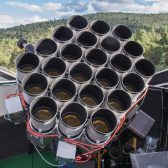
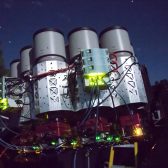
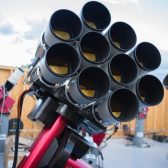
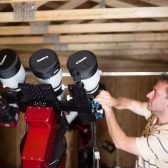
Canon U.S.A. Inc., to Provide 120 EF 400mm f/2.8L IS II USM Lenses for Expansion of the Dragonfly Telephoto Array Project

Canon USA continues to dabble in space projects along with Canon Inc.  Canon USA is sending Project Dragonfly 120 Canon RF 400mm f/2.8L IS II USM lenses. Project Dragonfly is an international research team consisting of Yale University and the University of Toronto researchers.


image2-168x168.jpg


image3-168x168.jpg


image4-168x168.jpg


image5-168x168.jpg


image6-168x168.jpg


image7-168x168.jpg


About Project Dragonfly
The Dragonfly Telephoto Array is a novel telescope concept...

Continue reading...


R5 LR noise

I recently obtained a R5 but seem to be struggling with noise shown in the RAW file in LR even for low ISO (e.g. ISO 800). The same image on DPP shows hardly any noise. I also tried converting to DNG and importing that to LR but it still shows too much noise. Below is the .CR3 image on LR at 100% showing noise followed by the same image in DPP showing less noise. Is this a LR or R5 issue? Do I need to run all images through DPP (export to JPG) before editing in LR? (I use Manual Auto ISO). Please help.

1637496224555.png

1637496411701.png

Vehicle AF and more coming to the Canon EOS R5 and Canon EOS R6 in December firmware update

I reported a couple of weeks ago that we’d be getting new firmware for the Canon EOS R5 sometime around the Canon EOS R3 ship date of November 26, 2021. This release has now been confirmed along with new firmware for both the Canon EOS R6 and Canon EOS-1D X Mark III.
One of the new features for the Canon EOS R5 and Canon EOS R6 is “vehicle” AF mode. The EOS-1D X Mark III will not get this feature. The Canon EOS R5 and Canon EOS R6 will also receive updates to eye and face detection AF.
The Canon EOS-1D X Mark III will receive an update to head detection AF.
Another worthwhile new feature for the EOS R5 and EOS R6 is “SMOOTH...

Continue reading...

Firmware 1.50 for EOS R5, R6, and 1.60 for 1DX III for enhanced AF

Users are now able to select “vehicles” as the main subject. Inheriting this ability from the EOS R3, the cameras can track racing cars and bikes. The update also enhances the overall AF tracking of people, with improved eye and face detection even when the subject is wearing a mask, as well as adding body detection. Strengthening detection within the EOS-1D X Mark III for winter sports, the firmware provides improved head detection for subjects wearing goggles and helmets.

For professional photographers, their camera needs to operate as an extension of them, with seamless and intuitive functionality to help them capture the shot. This upgrade gives EOS R5 and EOS R6 owners the ability to set a custom white balance in Live View, streamlining manual white balance control. Across all models, the firmware ensures that photographers aren’t able to mistakenly transfer files by pressing the multi-controller when "Transfer with SET" is set for FTP transfer. Previously, the EOS-1D X Mark III employed separate buttons for voice memo and image rating, but with newly added settings users can use one button to do both functions simultaneously.

As the RF lens range continues to grow, photographers are able to unlock new possibilities with their cameras. Thanks to this latest update, the EOS R5 is now compatible with Canon's EOS VR SYSTEM and the RF 5.2mm F2.8L DUAL FISHEYE lens, enabling content creators to easily capture immersive footage for virtual reality. The update also offers full-time manual support for the RF 70-200mm F4L IS USM, even if AF is selected.

The EOS R5, EOS R6 and EOS-1D X Mark III firmware updates will be available to download from 2 December 2021 from the Canon support website.
  • Like
Reactions: 2 users

RF 14-35mm f/4L IS – Distortion Correction Testing

Mirrorless cameras lack an optical viewfinder, so looking through the lens is always an electronic process. This fact enables lens manufacturers to include consideration of digital optical corrections in their lens designs and make trade-offs accordingly – more optical aberrations can be tolerated because they will be corrected in the EVF and in processed images, so users will often not know they’re there in the first place.

MILC manufacturers other than Canon have leveraged this concept for many years. Canon’s implementation in the RF 24-240mm lens came as a surprise to many when it was initially reported on internet forums, with the lens having very strong barrel distortion at the wide end and forcing the application of correction in-camera and in DPP (i.e., unlike other lenses the correction cannot be disabled). The recently released RF 16mm f/2.8 is similar, and that is probably not surprising in a $300 UWA lens (in fact, most likely the design trade-off of strong distortion is one reason the lens is so relatively inexpensive). Canon seems to have confirmed this with their statement in the press release for the lens, “Long gone are the days of optical corrections…,” presumably because digital corrections are now the norm.

However, Canon also took this approach with the RF 14-35mm f/4L IS, their first time doing so with an L-series lens. Although I had some concerns about this level of correction, I decided to swap my EF 16-35/4L IS for it, in part for the smaller size and in part for the wider FoV when I don’t want to bring the EF 11-24/4L.

Lens in hand, I decided to see how bad the distortion really is, and how well it can be corrected with various RAW converters. I used the classic brick wall test, but rather than standing close I opted for a more distant shot where the ‘wall’ was the side of a 9-story building at a distance that captured most of the height. The reason for that was to avoid the potential issue of focus breathing, where the effective focal length of a lens is shorter with a close subject (one example of this is Canon’s 100L Macro, where at 1:1 it’s giving the framing of ~68mm). Note that in his image testing, Bryan of TDP indicates that framing his ‘enhanced ISO 12233’ chart at 14mm is done at a distance of less than 2’ / 60 cm. I ensured that the camera was level and orthogonal to the building to avoid vertical and horizontal distortions.

The first composite is a set of RAW conversions of the same single image, taken at 14mm f/8 (thumbnail below is a 1000 pixel wide image hosted on CR, full image is HERE).
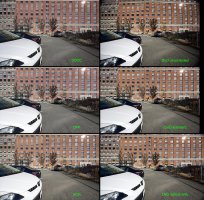
Full FoV with different RAW converters CR.jpg

The top right image was converted in DxO PhotoLab with all corrections turned off. The uncorrected image shows significant barrel distortion and some mechanical vignetting in the corners. Compared to the straight out of camera JPG (top left), the FoV of the uncorrected image is clearly wider than 14mm (how much wider is discussed below). In DPP, I converted the image with corrections set to 100% and with DLO. The FoV is the same as the SOOC image, but the vignetting correction is improved. Converting the image in Adobe Camera Raw with the lens profile yields a slightly wider FoV than with Canon’s lens profile (e.g., more of the window lintels are visible in the upper left corner, and the left edge of an additional column of windows is visible on the right edge. The standard (default) corrections in DxO deliver a noticeably wider FoV than ACR – another row of windows becomes visible in the top left and an additional full column of windows is visible on the right side. DxO also has an ‘optical corrections only’ option which does not force the corrected image into the original 3:2 aspect ratio, and the result there (bottom right) is an image of the same vertical FoV as standard but a wider horizontal FoV (another half-column of windows on the left). That image output is 305 pixels wider than the EOS R’s native output.

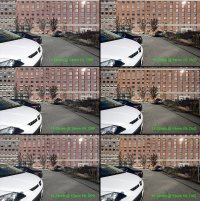
How much wider is the FoV of the corrections with DxO? To assess that, I took a series of images from 14mm down to 11mm on the EF 11-24mm. Shown is the comparison of the RF 14-35mm at 14mm (middle panels) with the EF 11-24mm at 14mm (top) and 13mm (bottom), converted with either DPP or DxO (thumbnail below is a 1000 pixel wide image hosted on CR, full image is HERE).
14-35mm vs 11-24mm FoV CR.jpg

When converted with DPP, the FoV of the 14-35mm at 14mm is very slightly narrower than that of the 11-24mm at 14mm (where distortion is very modest). With DxO, the FoV of the 14-35mm at 14mm is comparable to ~13.5mm on the 11-24mm lens, meaning with optimal corrections the lens is delivering a wider-than-specified FoV. I’ll take it!

For the uncorrected image, based on the ‘corners’ of the strongly distorted image to the series of images taken from 14mm to 11mm on the EF 11-24mm, the FoV of the 14-35mm at 14mm approximates slightly under 13mm.

On this and other forums, there have been ‘tests’ that suggest the image from this and other strongly distorted lenses are cropped and then upscaled (I initially thought this might be the case, but it isn’t). These tests suffer from one or more flaws. A common approach prior to the availability of a lens profile from Adobe has been to drag the distortion slider to 100 then crop the image to the proportions of the in-camera JPG. However, when performing a manual correction for barrel distortion in LR/PS/ACR, dragging the slider to +100 does not equate to correcting 100% of the distortion. Rather, the slider is merely an arbitrary scale of 100 units of correction in the (+) direction for correcting barrel distortion or in the (–) direction for correcting pincushion distortion. In other words, +100 is likely too much correction. In the case of the 14-35mm at 14mm, around +35 to +40 does a reasonable job of correcting the barrel distortion.

Manual distortion correction assumes the characteristic of the distortion is linear (along the image radial), and that's almost never going to be the case. So, if you drag the distortion correction slider to the point where horizontal lines in the corners of the scene appear horizontal in the image, then there is residual barrel distortion of lines in the mid-frame. Conversely, if you drag the distortion correction slider to the point where horizontal lines in the mid-frame of the scene appear horizontal in the image, pincushion distortion of lines in the corners is introduced. Basically, manual distortion correction is applying a linear process to a non-linear aberration.

That's where lens profiles come into play. Applying the lens profile for the 14-35/4 in ACR and other RAW converters results in horizontal lines in both the corners and the mid-frame appearing horizontal in the image, i.e., the profile includes a non-linear correction for distortion. The same can be achieved in Photoshop using a warp transform, for example. In the case of an even more complex distortion (e.g., mustache) a warp-type transformation is really the only way it can be corrected. Doing so does 'stretch' the corners of the image, so in that sense there are 'fake pixels' being created, but it allows geometric correction without the need to crop then upscale the image.

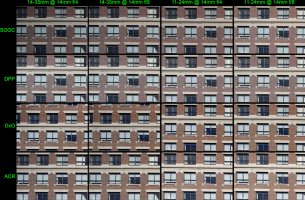
That begs the question of how detail-destructive that warping correction is in practice. Below are 100% crops (1000x667 pixels) from the extreme upper left corner of the corrected 14-35mm images at f/4 and f/8, along with crops from the 11-24mm corners, also corrected but with much less correction required because of the better optical correction in the lens (thumbnail below is a 1000 pixel wide image hosted on CR, full image is HERE).
Corner crops at f4 and f8 CR.jpg

There are differences between the RAW converters but overall, the results in all cases are quite good, with very subtle differences if any between the highly corrected 14-35mm corners and the lightly corrected 11-24mm corners.

Based on the above, I’m more than satisfied with my new RF 14-35mm f/4L IS (and I recommend DxO PhotoLab for those wanting to get the most from it).

  • Like
Reactions: 8 users

Filter

Forum statistics

Threads
37,480
Messages
975,426
Members
24,816
Latest member
GLBDD

Gallery statistics

Categories
1
Albums
29
Uploaded media
372
Embedded media
1
Comments
25
Disk usage
1 GB