Only 2 minutes of HQ 4k video after 164 images

This is not good considering the 164 shots were taken over 2 hours. Taking one 2 minute video would basically brick the camera for 10-15 minutes before you can use it again.

https://www.dpreview.com/articles/8...tup-quickly-cut-into-promised-capture-times/2

Richard's EOS R5 photo experience

Days after conducting these video tests, I went shooting at a local nature reserve using the Canon 800mm F11 USM IS lens. It was another hot day, for Seattle (27°C / 81°F).

In just under two hours I shot 164 images, all in CRAW, some as parts of short bursts. I then switched to video mode to capture some 4K HQ footage and was confronted by 04:00 minute limit, despite plenty of card capacity.

The overheat warning displayed immediately and, after shooting three sub-10-second clips the camera said it would only shoot for another 02:00 minutes.
 
This is not good considering the 164 shots were taken over 2 hours. Taking one 2 minute video would basically brick the camera for 10-15 minutes before you can use it again.

https://www.dpreview.com/articles/8...tup-quickly-cut-into-promised-capture-times/2

Richard's EOS R5 photo experience

Days after conducting these video tests, I went shooting at a local nature reserve using the Canon 800mm F11 USM IS lens. It was another hot day, for Seattle (27°C / 81°F).

In just under two hours I shot 164 images, all in CRAW, some as parts of short bursts. I then switched to video mode to capture some 4K HQ footage and was confronted by 04:00 minute limit, despite plenty of card capacity.

The overheat warning displayed immediately and, after shooting three sub-10-second clips the camera said it would only shoot for another 02:00 minutes.
It does not brick the camera, it will continue operating and taking stills. The camera being exposed to the hot sun exceeded the temp limit for 4K video or reduced it. That means no 4K video until the camera cools off. For those who plan to do a lot of video in warm weather, its not the right camera.
 
Upvote 0
It does not brick the camera, it will continue operating and taking stills. The camera being exposed to the hot sun exceeded the temp limit for 4K video or reduced it. That means no 4K video until the camera cools off. For those who plan to do a lot of video in warm weather, its not the right camera.

considering stills quality will be degraded, as documented in the manual, this is pretty disappointing
 
Upvote 0
I received the R5 on Tuesday. Well built, fine to use. The EVF works well. Only in brighter conditions it is hard to see the pictures, as I wear glasses.
But where I am concerned about is, that after shooting 800 pics in fast mode on two fighting red skites, no video was possible in 4k. It took more than one hour to cool down. Maybe I did not set the right 4k mode, but this is definitively not the thing I was expecting.
Therefore I switched to my old 5D MK IV and shot a very nice second red kite fight with an big amount of data and splitted files, but it recorded it well.

If someone knows an tip how to avoid this problem, please post it.
 
  • Like
Reactions: 1 users
Upvote 0
I received the R5 on Tuesday. Well built, fine to use. The EVF works well. Only in brighter conditions it is hard to see the pictures, as I wear glasses.
But where I am concerned about is, that after shooting 800 pics in fast mode on two fighting red skites, no video was possible in 4k. It took more than one hour to cool down. Maybe I did not set the right 4k mode, but this is definitively not the thing I was expecting.
Therefore I switched to my old 5D MK IV and shot a very nice second red kite fight with an big amount of data and splitted files, but it recorded it well.

If someone knows an tip how to avoid this problem, please post it.

make sure 4K HQ Mode is disabled
then choose 4K 24-30 fps frame rate.
or
enable movie cropping
then choose 4K 24-30 fps frame rate
 
  • Like
Reactions: 1 user
Upvote 0

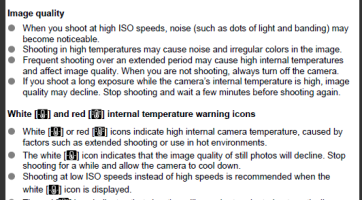
page 284:... no... it says that frequent shooting over extended period of time and shooting in high temperatures may cause image degradation..,
and then it is clearly defined that White or Red internal temperature icons indicate high internal camera temperature, caused by factors such as extended shooting or use in hot environments...

therefore it is absolutely certain that white or Red indicator will be ON when camera gets hot and image quality may be affected in result..

You are incorrect.

1596803604205.png
 
  • Like
Reactions: 1 users
Upvote 0
page 284:... no... it says that frequent shooting over extended period of time and shooting in high temperatures may cause image degradation..,
and then it is clearly defined that White or Red internal temperature icons indicate high internal camera temperature, caused by factors such as extended shooting or use in hot environments...

therefore it is absolutely certain that white or Red indicator will be ON when camera gets hot and image quality may be affected in result..

You are incorrect.

View attachment 191963

lol i liked how you croped out the part that says it wont always show. are you in denial?

Screenshot (89).png
 
  • Like
Reactions: 1 user
Upvote 0
I’m confused... so you could be shooting for ages in still mode and not see overheat warning (which would indicate IQ degradation). But if you switch over to one of the movie modes, The white overheat icon may pop up, indicating that still IQ is (already) in decline?
 
  • Like
Reactions: 1 user
Upvote 0
lol i liked how you croped out the part that says it wont always show. are you in denial?

View attachment 191967

This is not an uncommon phenomenon and not exclusive to the R5. It happens on all photo cameras. Even my 40D once "overheated" on a hot sweaty festival tent in high summer. Yes a hot environment will introduce more noise to the image because the sensor gets hot too, nothing you should be worrying out because you'll barely notice the difference.
 
  • Like
Reactions: 1 user
Upvote 0