5D4 Sensor Defect Discovered

Mikehit said:
And all this is why some recommend that rather than shooting at ISO1600 for X seconds it is sometimes better to shoot at ISO 3200 for X/2 seconds. Or, if feasible, shoot at ISO 3200 for X seconds to overexpose (to increase signal to noise ratio) and bring it down in post processing.
It is one thing to identify a problem (anyone can do that), another to know how the camera works so you can work within the camera's limitations.

^^This

I'm not sure why people have such difficulty understanding and/or accepting this concept. Shoot RAW and expose to the right (ETTR). Be aware that the histogram and highlight warning ('blinkies') are jpg-based, so the 'R' may further right than it appears – with experience, you learn how much headroom you have (or you can try the UniWB trick to get a better RAW-approximating jpg). If your shadow detail is more than 13-14 stops darker than your highlights, no amount of post-processing will successfully recover them. In that case, you need to decide whether to sacrifice highlight detail, shadow detail, or some of each; or if the scene permits, take multiple exposures and blend them.

If you are expecting your camera to capture the full range of detail in a scene with >14 stops, or expecting to recover detail that's well below the noise threshold, the problem is not the camera, it's your unrealistic expectations and lack of understanding.
 
Upvote 0
Gentlemen, I hope that this introductory photography course was not written just for me exclusively :D LOL I am aware of most of what was brought forward :) As a curious researcher, I noticed that amount of parasitic noise seems to relates to exposure duration. that' all :)
And.. unfortunatelly my 6D's clipping (shadows clipping to highlights clipping) range is only 5.3EV at base ISO. Substantially less than 13-14 stops unfortunately but that does not prevent me from taking properly exposed photographs most of the time :)

.
neuroanatomist said:
Mikehit said:
And all this is why some recommend that rather than shooting at ISO1600 for X seconds it is sometimes better to shoot at ISO 3200 for X/2 seconds. Or, if feasible, shoot at ISO 3200 for X seconds to overexpose (to increase signal to noise ratio) and bring it down in post processing.
It is one thing to identify a problem (anyone can do that), another to know how the camera works so you can work within the camera's limitations.

^^This

I'm not sure why people have such difficulty understanding and/or accepting this concept. Shoot RAW and expose to the right (ETTR). Be aware that the histogram and highlight warning ('blinkies') are jpg-based, so the 'R' may further right than it appears – with experience, you learn how much headroom you have (or you can try the UniWB trick to get a better RAW-approximating jpg). If your shadow detail is more than 13-14 stops darker than your highlights, no amount of post-processing will successfully recover them. In that case, you need to decide whether to sacrifice highlight detail, shadow detail, or some of each; or if the scene permits, take multiple exposures and blend them.

If you are expecting your camera to capture the full range of detail in a scene with >14 stops, or expecting to recover detail that's well below the noise threshold, the problem is not the camera, it's your unrealistic expectations and lack of understanding.
 
Upvote 0
Alex_M said:
And.. unfortunatelly my 6D's clipping (shadows clipping to highlights clipping) range is only 5.3EV at base ISO. Substantially less than 13-14 stops...

May I ask how you're making that determination?

DxO's quantitative measure ('engineering DR) puts the 6D at 12.1 stops of DR at base ISO. Bill Claff's more conservative and probably more useful calculation of 'photographic DR' is 9.2 stops at base ISO, and that is essentially matches what DPR gets with their empirical measurement based on shooting a Stouffer transmission step wedge.

So if you're seeing only 5.3 stops, four stops less DR than a 'real world' calculation and a matching empirical test done by different reviewers, something isn't adding up correctly.
 
Upvote 0
neuroanatomist said:
Alex_M said:
And.. unfortunatelly my 6D's clipping (shadows clipping to highlights clipping) range is only 5.3EV at base ISO. Substantially less than 13-14 stops...

May I ask how you're making that determination?

DxO's quantitative measure ('engineering DR) puts the 6D at 12.1 stops of DR at base ISO. Bill Claff's more conservative and probably more useful calculation of 'photographic DR' is 9.2 stops at base ISO, and that is essentially matches what DPR gets with their empirical measurement based on shooting a Stouffer transmission step wedge.

So if you're seeing only 5.3 stops, four stops less DR than a 'real world' calculation and a matching empirical test done by different reviewers, something isn't adding up correctly.

sounds like shooting JPEG's in "canon standard" picture mode
 
Upvote 0
Alex_M said:
Gentlemen, I hope that this introductory photography course was not written just for me exclusively

No, don't worry :D
I have seen a lot of discussions get derailed by misunderstanding and bystanders chipping in, so I tend to make sure it is clear where my logic comes from, albeit at the risk of insulting the intelligence of the immediate recipient.
 
Upvote 0
I bee digging now through all thse post so my question:

how does Canon react - they just exchange the bodies?

through all that i read now its certain that its a hardware problem and not fixable through an update since Canon is replacing them

but there has been no official statement till now
 
Upvote 0
Great question.

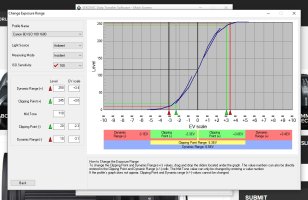
I used Sekonic DTS software and X-Rite Colorchecker Passport to determine the DR of my camera and the clipping range. Software is available for download on Sekonic website and is used for light meter to camera calibration.
In the process of creation of custom camera profile, I took 3 shots of the X-Rite colorchecker Passport
At -3Ev , 0EV, and +3EV. Then, all 3 images were loaded in Sekonic DTS for analysis. DR of my camera was identified being 6.5 EV. That's in 10-250 range. Please see the photo attached.
In reality, clipping occurres a bit earlier than that. Therefore I have adjusted clipping margins to 20-245 -as it was recommended to me. The end result was : 5.3EV clipping range ( -2.3ev middle grey to shadows clipping and 3.0EV middle grey to highlights clipping).
The takeaway from this test is: I can spot meter for extreme highlights and then dial in up to +3 stops of exposure compensation before my highlights will clip at ISO 100 or open up aperture or shutter by the same amount of stops. I usually do 2.5 EV just to be on the safe side. Oh, and my clipped highlights in camera warning ( the blinkies) comes up much earlier than that. roughly about 1 stop earlier than they really should :)
I wish that I had 9.2 stops of useful photographic dynamic range to play with. That would give me an ability to open up shutter or aperture by 4.5 stops for the ETTR. unfortunately, it is given that I cannot push my extreme highlights exposure by more than 3EV so it seems that DTS software gets it right: 3 stops up and 2.3 stops down for me.

Subsequently, I transferred my camera custom profile to my Sekonic 478 light meter. That gives me an ability to see where my middle greys, shadows and highlights are and if I need to consider multiple exposures for the scene. I take incident light metering and then spot meter extreme highlights and shadows. Takes half a minute at longest.
It saves me time and pain in post. I like to be in control rather than guessing :)

P.S. I compared my results with others and they are within the range for my camera. I shoot RAW only. One can download Sekonic DTS software and conduct the test with its own camera.
P.S 2. Sony Exmore sensor apparently comes up at about 6.5 EV usable DR - clipping range. Not a big deal. just about 1.2 EV better than Canon 6D. Nothing to call home about.

P.S 3. if you look at the graph, there is definitely about 9.2 of DR available if measured from 0 all the way to 255 but they recon that DR should be measured for 10-250 range and clipping point range - or usable DR is within 20 -245 range. ( likely monitor / print process gamut limitation? not sure.. will investigate when I have time).

neuroanatomist said:
Alex_M said:
And.. unfortunatelly my 6D's clipping (shadows clipping to highlights clipping) range is only 5.3EV at base ISO. Substantially less than 13-14 stops...

May I ask how you're making that determination?

DxO's quantitative measure ('engineering DR) puts the 6D at 12.1 stops of DR at base ISO. Bill Claff's more conservative and probably more useful calculation of 'photographic DR' is 9.2 stops at base ISO, and that is essentially matches what DPR gets with their empirical measurement based on shooting a Stouffer transmission step wedge.

So if you're seeing only 5.3 stops, four stops less DR than a 'real world' calculation and a matching empirical test done by different reviewers, something isn't adding up correctly.

 

Attachments

  • Sekonic DTS Canon 6D ISO 100.jpg
    Sekonic DTS Canon 6D ISO 100.jpg
    173.4 KB · Views: 120
Upvote 0
I will post some images later but I can see the issues clearly in mine. And it impacts the exact type of images I do.
I tend to do a lot of 2-5 min landscape exposures. I hoped with the upgrade from the mark 3 to 4 that I could lift the foreground detail more.

Even a lift of a digital gradient filter of 3 stops and no shadow push shows the horizontal purpleish streaks.

I dont see it if I do similar with a fast exposure, underexposed to the same degree and apply similar.

It gets worse the longer the exposure which seems to indicate its hardware/read noise.

Its really horrible banding thats impossible to get rid of.

Update - I need to do more testing - I had the shadow slider up when I saw the streaks at their worst - the rest of the above is true, it seems to get worse with exposure length. The streaks are strongest on the left and there is a bright / dark pattern to them

So far... with the Mark 3
-- A fast exposure has no issue.
-- A long exposure with underexposed foreground - pushed to 3 stops and 20% shadow - no issue
-- A long exposure with underexposed foreground - pushed to 3 stops and 50% shadow - horrible streaks appear on the lower left side is strongest and they fade across the frame (but this a pretty extreme boost but it was something I was hoping to be able to do with the Mark IV as a 10ND filter tends to really darken foreground rocks and beach etc)

However, similar photos on my Mark 3
-- A long exposure with underexposed foreground - pushed to 3 stops and 0% shadow - the whole frame is covered in vertical streaks
-- A long exposure with underexposed foreground - pushed to 3 stops and 20% shadow - the whole frame is covered in vertical streaks and its a total mess
-- A long exposure with underexposed foreground - pushed to 3 stops and 50% shadow - the whole frame is covered in vertical streaks and it looks like someone drew the image in pencil its basically just vertical streaks!

So the Mark IV is definitely better than the 3 but maybe thats just the limits. I still have the mark 3 and I will attempt to get a side by side shot comparison to really see...
 
Upvote 0
I got a replacement 5D4. It exhibits the issue. The limit is shooting blacks at -3EV and then setting +3 in post (just exposure, shadows were left at 0) using Canon's latest DPP.
The color banding slightly manifests itself at the bottom of the image. The black jacket is shown as brown but this is the idea: uplifting shadows.

Anyway I will try to test it in a real environent (landscapes) on Sunday so as to be practical. I know that the issue will be non-existent when shooting birds but I am not so sure about landscapes. I never use -3EV and try to apply the ETTR rule keeping at the same time highlight alerts enabled. There is a specific case (I have mentioned it like a hundred times so not again) that will put the camera to its limits - that up to now I handle with my 5D3 with ML) but this can be tested in about 7 months or so not now...

To sum up I will try to test it on landscapes and if possible find some that include shadows. We will see.
 
Upvote 0
Interesting you can see it in DPP. I finally got to compare the same images in DPP and Lightroom. I can get the streaks to show easily in Lightroom, but no sign at all in DPP.

The user Tally over on the potn forum has a good test to show the pattern.
Take an image with the body cap on and cover the viewfinder.

Vary the iso (try 100, 200, 400) but take the images at 20s. Then in lightroom set the white slider to 80%.

This will show the pattern banding unique to your sensor (obviously not a real world photo its just to show what your sensor is doing). Hes collecting samples and they all have it but each are different.

Not sure if this will impact real world shots yet... but it may be useful to know the limits...
 
Upvote 0
PixelTrawler said:
Interesting you can see it in DPP. I finally got to compare the same images in DPP and Lightroom. I can get the streaks to show easily in Lightroom, but no sign at all in DPP.

The user Tally over on the potn forum has a good test to show the pattern.
Take an image with the body cap on and cover the viewfinder.

Vary the iso (try 100, 200, 400) but take the images at 20s. Then in lightroom set the white slider to 80%.

This will show the pattern banding unique to your sensor (obviously not a real world photo its just to show what your sensor is doing). Hes collecting samples and they all have it but each are different.

Not sure if this will impact real world shots yet... but it may be useful to know the limits...
If we repeat the test with a 5D3 (with its known limitations) with the same settings and the 5D3 behaves better then we have a problem. But if not maybe we have hit upon the 5D4 limitation...
 
Upvote 0
PixelTrawler said:
Oh Ive done the 5d3 comparison. For my two units, the 3 is worse...
The 4 is definitely better, at least for mine...

So in 24 pages of a Defective Sensor thread we have determined that the perceived defect we find that in reality it wasn't a defect at all, the Mark IV is an improved version over the old III.

Edit: In previous posts there were comments about Canon acknowledging this issue. It appears they have since they say the IV is an improvement over the III.
 
Upvote 0
PixelTrawler said:
Interesting you can see it in DPP. I finally got to compare the same images in DPP and Lightroom. I can get the streaks to show easily in Lightroom, but no sign at all in DPP.

Interesting......

This raises the possibility that it is not a sensor issue, but the decoding of the RAW file by Adobe....
Anyone care to give this a try with another RAW decoder?
 
Upvote 0
Don Haines said:
PixelTrawler said:
Interesting you can see it in DPP. I finally got to compare the same images in DPP and Lightroom. I can get the streaks to show easily in Lightroom, but no sign at all in DPP.

Interesting......

This raises the possibility that it is not a sensor issue, but the decoding of the RAW file by Adobe....
Anyone care to give this a try with another RAW decoder?


Asked a similar question way back on page 10 unless I missed it only DPP and Adobe are being used in these tests I'd love to know what C1 and DxO do. I didn't upgrade my DxO so can't help.
 
Upvote 0
takesome1 said:
PixelTrawler said:
Oh Ive done the 5d3 comparison. For my two units, the 3 is worse...
The 4 is definitely better, at least for mine...

So in 24 pages of a Defective Sensor thread we have determined that the perceived defect we find that in reality it wasn't a defect at all, the Mark IV is an improved version over the old III.

Edit: In previous posts there were comments about Canon acknowledging this issue. It appears they have since they say the IV is an improvement over the III.
Not so fast: "They" is one person. I shot similar pictures and 5D3 did not have this color bands. The image was worse only in the 1% where there was nothing but pure black. In the rest of 99% the 5D3 image was better. Slight noise but NO color bands...
 
Upvote 0
zim said:
Don Haines said:
PixelTrawler said:
Interesting you can see it in DPP. I finally got to compare the same images in DPP and Lightroom. I can get the streaks to show easily in Lightroom, but no sign at all in DPP.

Interesting......

This raises the possibility that it is not a sensor issue, but the decoding of the RAW file by Adobe....
Anyone care to give this a try with another RAW decoder?


Asked a similar question way back on page 10 unless I missed it only DPP and Adobe are being used in these tests I'd love to know what C1 and DxO do. I didn't upgrade my DxO so can't help.
As a group, when faced with incomplete data, we are fast to jump to the most disastrous scenario and ignore the probable :)
 
Upvote 0