5D4 Sensor Defect Discovered

tron said:
Here is a second raw file (sorry for the stupid photo I made it in the rush at home) in case someone is interested.

It is shot at -3 2/3

https://www.dropbox.com/s/uz1rj8it9i21xj2/274A7655.CR2?dl=0

PS CC 2017

I see the start of banding at +2 exposure, +50 shadows.

Most prominent near the middle of the right arm sleeve
 
Upvote 0
ZachOly said:
tron said:
Here is a second raw file (sorry for the stupid photo I made it in the rush at home) in case someone is interested.

It is shot at -3 2/3

https://www.dropbox.com/s/uz1rj8it9i21xj2/274A7655.CR2?dl=0

PS CC 2017

I see the start of banding at +2 exposure, +50 shadows.

Most prominent near the middle of the right arm sleeve
Exactly! The -3 version is much better.
 
Upvote 0
tron said:
ZachOly said:
tron said:
Here is a second raw file (sorry for the stupid photo I made it in the rush at home) in case someone is interested.

It is shot at -3 2/3

https://www.dropbox.com/s/uz1rj8it9i21xj2/274A7655.CR2?dl=0

PS CC 2017

I see the start of banding at +2 exposure, +50 shadows.

Most prominent near the middle of the right arm sleeve
Exactly! The -3 version is much better.
Here is a similar picture. Although it says -3 2/3 I must have metered differently since anything else being equal shutter speed is 1/13 instead of 1/25.

https://www.dropbox.com/s/nql0fjfws42fmeo/274A7656.CR2?dl=0
 
Upvote 0
ZachOly said:
tron said:
Here is a second raw file (sorry for the stupid photo I made it in the rush at home) in case someone is interested.

It is shot at -3 2/3

https://www.dropbox.com/s/uz1rj8it9i21xj2/274A7655.CR2?dl=0

PS CC 2017

I see the start of banding at +2 exposure, +50 shadows.

Most prominent near the middle of the right arm sleeve

I just downloaded that file and opened it in Photoshop CC 2017. ACR settings used were: exposure +4, shadows +50, highlights -10, contrast +27.

I can only say that on my monitor I couldn't see banding and the image quality seemed fantastic too me considering the processing settings. Admittedly my monitor isn't anything great (27" Samsung FHD monitor from a few years ago now), and I'm not familiar with how other cameras like a Nikon D810 or one of the new Sonys would go - and perhaps I'm just not looking closely enough - but I'm just not seeing any issue to complain about.

I will be very interested to know what others think after they try out the file.
 
Upvote 0
jd7 said:
ZachOly said:
tron said:
Here is a second raw file (sorry for the stupid photo I made it in the rush at home) in case someone is interested.

It is shot at -3 2/3

https://www.dropbox.com/s/uz1rj8it9i21xj2/274A7655.CR2?dl=0

PS CC 2017

I see the start of banding at +2 exposure, +50 shadows.

Most prominent near the middle of the right arm sleeve

I just downloaded that file and opened it in Photoshop CC 2017. ACR settings used were: exposure +4, shadows +50, highlights -10, contrast +27.

I can only say that on my monitor I couldn't see banding and the image quality seemed fantastic too me considering the processing settings. Admittedly my monitor isn't anything great (27" Samsung FHD monitor from a few years ago now), and I'm not familiar with how other cameras like a Nikon D810 or one of the new Sonys would go - and perhaps I'm just not looking closely enough - but I'm just not seeing any issue to complain about.

I will be very interested to know what others think after they try out the file.
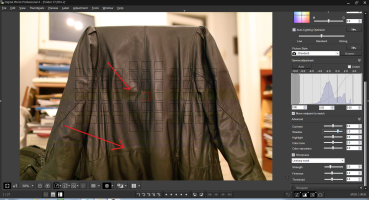
This is latest DPP. Interesting about CC since ZachOly sees it with less extreme settings.
 

Attachments

  • show-banding.png
    show-banding.png
    2.9 MB · Views: 182
Upvote 0
tron said:
jd7 said:
ZachOly said:
tron said:
Here is a second raw file (sorry for the stupid photo I made it in the rush at home) in case someone is interested.

It is shot at -3 2/3

https://www.dropbox.com/s/uz1rj8it9i21xj2/274A7655.CR2?dl=0

PS CC 2017

I see the start of banding at +2 exposure, +50 shadows.

Most prominent near the middle of the right arm sleeve

I just downloaded that file and opened it in Photoshop CC 2017. ACR settings used were: exposure +4, shadows +50, highlights -10, contrast +27.

I can only say that on my monitor I couldn't see banding and the image quality seemed fantastic too me considering the processing settings. Admittedly my monitor isn't anything great (27" Samsung FHD monitor from a few years ago now), and I'm not familiar with how other cameras like a Nikon D810 or one of the new Sonys would go - and perhaps I'm just not looking closely enough - but I'm just not seeing any issue to complain about.

I will be very interested to know what others think after they try out the file.
This is latest DPP. Interesting about CC since ZachOly sees it with less extreme settings.

OK, what I'm seeing in PS CC is very similar to what is in your screenshot from DPP.

Looking at the two areas where your arrows point, I'm not seeing what I would call banding. I put it down to simply being the way the light was reflecting off the jacket at those points. I suppose that might not be the case, especially where you're lower arrow is pointing, but I assumed there must have been some fold/crease/bend in the jacket and it was enough to reflect the light like that.

Am I not looking at the right thing/effect? Am I missing something?
 
Upvote 0
jd7 said:
tron said:
jd7 said:
ZachOly said:
tron said:
Here is a second raw file (sorry for the stupid photo I made it in the rush at home) in case someone is interested.

It is shot at -3 2/3

https://www.dropbox.com/s/uz1rj8it9i21xj2/274A7655.CR2?dl=0

PS CC 2017

I see the start of banding at +2 exposure, +50 shadows.

Most prominent near the middle of the right arm sleeve

I just downloaded that file and opened it in Photoshop CC 2017. ACR settings used were: exposure +4, shadows +50, highlights -10, contrast +27.

I can only say that on my monitor I couldn't see banding and the image quality seemed fantastic too me considering the processing settings. Admittedly my monitor isn't anything great (27" Samsung FHD monitor from a few years ago now), and I'm not familiar with how other cameras like a Nikon D810 or one of the new Sonys would go - and perhaps I'm just not looking closely enough - but I'm just not seeing any issue to complain about.

I will be very interested to know what others think after they try out the file.
This is latest DPP. Interesting about CC since ZachOly sees it with less extreme settings.

OK, what I'm seeing in PS CC is very similar to what is in your screenshot from DPP.

Looking at the two areas where your arrows point, I'm not seeing what I would call banding. I put it down to simply being the way the light was reflecting off the jacket at those points. I suppose that might not be the case, especially where you're lower arrow is pointing, but I assumed there must have been some crease in the jacket and it was enough to reflect the light like that.

Am I not looking at the right thing/effect? Am I missing something?
I thought so the previous time where I shot black trousers. When I shot the jacket in a different room under different lighting this was it. Not a reflection. But it was noise alright. I see it when at 100%. It simply becomes banding and stays there even if I try to remove chroma noise.
 
Upvote 0
jd7 said:
tron said:
jd7 said:
ZachOly said:
tron said:
Here is a second raw file (sorry for the stupid photo I made it in the rush at home) in case someone is interested.

It is shot at -3 2/3

https://www.dropbox.com/s/uz1rj8it9i21xj2/274A7655.CR2?dl=0

PS CC 2017

I see the start of banding at +2 exposure, +50 shadows.

Most prominent near the middle of the right arm sleeve

I just downloaded that file and opened it in Photoshop CC 2017. ACR settings used were: exposure +4, shadows +50, highlights -10, contrast +27.

I can only say that on my monitor I couldn't see banding and the image quality seemed fantastic too me considering the processing settings. Admittedly my monitor isn't anything great (27" Samsung FHD monitor from a few years ago now), and I'm not familiar with how other cameras like a Nikon D810 or one of the new Sonys would go - and perhaps I'm just not looking closely enough - but I'm just not seeing any issue to complain about.

I will be very interested to know what others think after they try out the file.
This is latest DPP. Interesting about CC since ZachOly sees it with less extreme settings.

OK, what I'm seeing in PS CC is very similar to what is in your screenshot from DPP.

Looking at the two areas where your arrows point, I'm not seeing what I would call banding. I put it down to simply being the way the light was reflecting off the jacket at those points. I suppose that might not be the case, especially where you're lower arrow is pointing, but I assumed there must have been some fold/crease/bend in the jacket and it was enough to reflect the light like that.

Am I not looking at the right thing/effect? Am I missing something?

It's like wide 'greenish' horizontal bands right across the width of the image. The arrows point to the edges of the banding. (Viewing on tablet so colour probably not to accurate)
 
Upvote 0
zim said:
jd7 said:
tron said:
jd7 said:
ZachOly said:
tron said:
Here is a second raw file (sorry for the stupid photo I made it in the rush at home) in case someone is interested.

It is shot at -3 2/3

https://www.dropbox.com/s/uz1rj8it9i21xj2/274A7655.CR2?dl=0

PS CC 2017

I see the start of banding at +2 exposure, +50 shadows.

Most prominent near the middle of the right arm sleeve

I just downloaded that file and opened it in Photoshop CC 2017. ACR settings used were: exposure +4, shadows +50, highlights -10, contrast +27.

I can only say that on my monitor I couldn't see banding and the image quality seemed fantastic too me considering the processing settings. Admittedly my monitor isn't anything great (27" Samsung FHD monitor from a few years ago now), and I'm not familiar with how other cameras like a Nikon D810 or one of the new Sonys would go - and perhaps I'm just not looking closely enough - but I'm just not seeing any issue to complain about.

I will be very interested to know what others think after they try out the file.
This is latest DPP. Interesting about CC since ZachOly sees it with less extreme settings.

OK, what I'm seeing in PS CC is very similar to what is in your screenshot from DPP.

Looking at the two areas where your arrows point, I'm not seeing what I would call banding. I put it down to simply being the way the light was reflecting off the jacket at those points. I suppose that might not be the case, especially where you're lower arrow is pointing, but I assumed there must have been some fold/crease/bend in the jacket and it was enough to reflect the light like that.

Am I not looking at the right thing/effect? Am I missing something?

It's like wide 'greenish' horizontal bands right across the width of the image. The arrows point to the edges of the banding. (Viewing on tablet so colour probably not to accurate)

I do see it now. And I agree it doesn't look like just the way light is reflecting off the jacket.

I tried opening the file in the Affinity Windows Beta. Viewing at 100%, with exposure set to +2 (which seems to be the max) and shadows set to +100 (again, maximum), I can see it clearly enough. Noise reduction didn't seem to do much to it at all. Reducing saturation to -30 made it pretty much disappear. Boosting saturation made it more and more obvious (it appeared fairly yellow, at least on my monitor).

Went back to Photoshop CC and processed it as I did earlier, and I can see it now - although it was definitely more obvious in Affinity, at least with the settings I'd used. As with Affinity, noise reduction didn't seem to do much to it. Reducing saturation helped a bit, although not as much as in Affinity. I found as I reduced the saturation the streaks/striping/banding (whatever you'd like to call it!) went black but stayed visible. After looking around the image, I think the worst area (at least in PS - I didn't go back and check Affinity) is an area about half-way vertically between where the two arrows point in Tron's earlier pic, and worst a little left of centre.

Would be interesting to see the same shot (well, as close as possible!) with another camera - ideally a few other cameras. Would like to see how a Sonikon camera, a 5DIII or 6D, and the 1DxII or 80D (since, like the 5dIV, they also have DPAF sensors) would perform. As has already been suggested, perhaps the answer is simply that all cameras (and the software) have a breaking point although how they behave past that point differs, and that amount of PP has taken this image past the breaking point for the camera/software ... but certainly interesting to compare against other cameras and see how they perform.

Perhaps someone has already done that sort of comparison and I've missed it?

I'm afraid I can't spend any more time investigating for now, but I will be interested to see what others come up with.
 
Upvote 0
neuroanatomist said:
zim said:
Sorry tron not sure what you mean by completely white picture, neuro isn't doing that. Perhaps he would be good enough to post his preset.

My settings were the DxO Standard (aka default), with only the exposure and shadows settings modified as highlighted previously with the green arrows.

It appears that tron is trying to process the RAW file into a usable shot, preserving highlights and maintaining clean shadows showing the deep blue-hour sky. That was not my intent. It would never be my intent for the scene under discussion, since I would have known when looking at the scene, before even extending my tripod and putting the camera on it, that it would be a fool's errand to do so from a single image. Given the scene, I'd have taken at least two, most likely three shots to blend the exposures.


Thanks, that's the bit that wasn't clear to me as some of the settings looked strange to me (contrast and micro contrast are off the scale to anything I've ever used). I thought the point of this was to test the limits of the sensor (break point) not get useable shots from such under exposure. Ignoring any streaking, none of these images are useable doing a simple lift, processing technique would have to change or as you say change capture method if you know what you're getting in to.
 
Upvote 0
Hey jd7 how you getting on with AP betas ? I just finished a bunch of christening photos and I'm pretty happy so far, only one crash ;D
I haven't used the raw module yet, not sure I ever will as I really like c1 so it's more of a finishing tool for me.
Didn't realise it could process 5d4 raw though so when I get a chance think I'll have a dabble with some of the images here and kill two birds with one stone.

Cheers
 
Upvote 0
tron said:
unfocused said:
tron said:
ZachOly said:
Anyone have a 1DX2 raw file that's underexposed?
My thoughts exactly :)

I have a 1DX2 ...But, I won't be "testing" these files...I'm just not that interested in esoteric experiments to test the limitations of a sensor...

What was the point to answer only to say you will not do anything? That's your right of course but you could lose the irony...

Admittedly, I'm being a bit rude, but frankly, as this thread closes in on 40 pages, I'm more and more convinced that this so-called "defect" is simply an example of how a particular sensor reacts when there is no data for it to read. It may be an interesting experiment for some people, but there doesn't seem to be any real knowledge or actionable information to be obtained.

zim said:
I thought the point of this was to test the limits of the sensor (break point) not get useable shots from such under exposure.

I have no problem with this approach. If others want to test the limits of any sensor, and report what they are finding, that's mildly interesting and might even be educational, but it's not what I choose to spend my time doing.

What I object to is that this thread overall seems to be feeding some hysteria that is a disservice to buyers. People are becoming convinced there is something "wrong" with their cameras and exchanging them for different bodies that then exhibit this same non-existent "defect."
 
Upvote 0
tron said:
PixelTrawler said:
tron said:
AlanF said:
tron said:
PixelTrawler said:
My own feeling so far is that my 5d4 has a higher limit than my 5d3.
But the 5d3 gradually degrades and the 4 holds til it falls over a cliff. The 3 is random noise, the 4 is streaks.

So far im finding that limit to be high enough not to be a problem. I havent done night city shots yet.

I may have a replacement 5d4 today due to another issue (dust inside the focusing screen out of the box, if the store cant clean it, theyll replace it. Its an annoying dark spot in the viewfinder near the right hand focus points). If so it will be interesting to see if its any different.
Some questions and/or thoughts:

If I were to guess I would say it will be the same. But please can you make the tests and tell us?
The reason is that I am on a second 5D4 which had exactly the same behaviour. First one started with 03 and second with 04.
Now depending on the outcome it may help in decision making:

1. Different (higher) first 2 numbers and no problem (or "problem" if you will): That's it I would return mine!
I would love to but I am not oprimistic...

2. Different (higher) first numbers and same with the first camera: No reason to return it. That's 5D4 period! Happy shooting!

3. Same (or less) first numbers and same problem: No information to use for decision making.

4. Same (or less) first numbers and no problem: Ooops! Huston we have a (random?) problem!
I highly doubt this will be the case though...

I have a first batch body, beginning 01. Absolutely none of the banding problems when pushed 3ev + 5shadows using DPP or +4ev + 100 shadows using DxO.
Thanks for letting us know. So now I truly feel confused. I remember LSXPhotog (in page 8 ) saying that his rental 5D4 didn't exhibit the issue. So it seems that banding issues were introduced later. I have no way to deal with this so as a further return of the camera (if accepted by the seller) will be most probably meaningless :(

I think if you replace the camera you will simply see a slighty different pattern (it seems from potn users every body has a unique pattern). Better to use it and enjoy it and maybe either software or firmware yields further improvements. The idea of trying to explain this in a store, then trying to find a better body seems like a challenge.
No it is much more difficult. A courier (UPS) comes and gets my camera. It takes 7 to 8 days to reach the store. Then they order another. Last time it took 2 days. Then they send it via UPS Standard. After 7 or 8 more days I get it back!!!!!!!!!!!!!! So I was thinking to tell them to get it back and tell me how much more for a 1DxII. This is why I asked for help (and got rudeness by a specific member). Never mind.

There are a few other forums to try where someone might be willing to do that for you...
 
Upvote 0
unfocused said:
tron said:
unfocused said:
tron said:
ZachOly said:
Anyone have a 1DX2 raw file that's underexposed?
My thoughts exactly :)

I have a 1DX2 ...But, I won't be "testing" these files...I'm just not that interested in esoteric experiments to test the limitations of a sensor...

What was the point to answer only to say you will not do anything? That's your right of course but you could lose the irony...

Admittedly, I'm being a bit rude, but frankly, as this thread closes in on 40 pages, I'm more and more convinced that this so-called "defect" is simply an example of how a particular sensor reacts when there is no data for it to read. It may be an interesting experiment for some people, but there doesn't seem to be any real knowledge or actionable information to be obtained.

zim said:
I thought the point of this was to test the limits of the sensor (break point) not get useable shots from such under exposure.

I have no problem with this approach. If others want to test the limits of any sensor, and report what they are finding, that's mildly interesting and might even be educational, but it's not what I choose to spend my time doing.

What I object to is that this thread overall seems to be feeding some hysteria that is a disservice to buyers. People are becoming convinced there is something "wrong" with their cameras and exchanging them for different bodies that then exhibit this same non-existent "defect."

I think on balance, its important information for potential buyers and owners that there are known limits being established, that streaks may appear is some real world scenarios. These are very expensive items to buy so the more info the better. I dont think anyone is suggesting the sensor is screwed, its more just dont expect it to work miracles. Its not a night vision system, if theres not enough data, this is what can happen. Its not what happened the 5d3 but its alternate wasnt good either, and its amazing compared to the 5d2 which was horrible when pushed.

Despite it being in mine and potentially being seen in some of my shots a) Im glad to know about it as I can change my post process flow or software and b) I love this camera. Any potential buyer.... buy it... but just be aware of some of its undocumented features....

Dont forget most potential buyers of this camera are 5d owners, thats what its aimed at, this unlikely to put many off. The worst flaw of this camera is canon pricing (Im in europe), it wont draw in other brand owners for the feature set.
 
Upvote 0
PixelTrawler said:
I think on balance, its important information for potential buyers and owners that there are known limits being established, that streaks may appear is some real world scenarios. These are very expensive items to buy so the more info the better. I dont think anyone is suggesting the sensor is screwed, its more just dont expect it to work miracles. Its not a night vision system, if theres not enough data, this is what can happen. Its not what happened the 5d3 but its alternate wasnt good either, and its amazing compared to the 5d2 which was horrible when pushed.

Despite it being in mine and potentially being seen in some of my shots a) Im glad to know about it as I can change my post process flow or software and b) I love this camera. Any potential buyer.... buy it... but just be aware of some of its undocumented features....

Dont forget most potential buyers of this camera are 5d owners, thats what its aimed at, this unlikely to put many off. The worst flaw of this camera is canon pricing (Im in europe), it wont draw in other brand owners for the feature set.

Agreed, that's my take away on this
 
Upvote 0
zim said:
PixelTrawler said:
I think on balance, its important information for potential buyers and owners that there are known limits being established, that streaks may appear is some real world scenarios. These are very expensive items to buy so the more info the better. I dont think anyone is suggesting the sensor is screwed, its more just dont expect it to work miracles. Its not a night vision system, if theres not enough data, this is what can happen. Its not what happened the 5d3 but its alternate wasnt good either, and its amazing compared to the 5d2 which was horrible when pushed.

Despite it being in mine and potentially being seen in some of my shots a) Im glad to know about it as I can change my post process flow or software and b) I love this camera. Any potential buyer.... buy it... but just be aware of some of its undocumented features....

Dont forget most potential buyers of this camera are 5d owners, thats what its aimed at, this unlikely to put many off. The worst flaw of this camera is canon pricing (Im in europe), it wont draw in other brand owners for the feature set.

Agreed, that's my take away on this


Yep, I like my 5D4 as well, but hate this "limitation", since it has already affected real life accidentally underexposed (then lifted) pics. I am not talking about anything maniac, just 2+ stops, which was more easy with 6D.

It would really help to see a testframe, where this really doesn´t show - so far I havent´t seen any. Many report "made the test, cannot see any problem" and it is not very realiable, since most of the people done it newly have found it. One person just reported in Michaels blog a RAW-frame that was supposed to be free of this phenomenon - it was just with too much details, nothing clipping so no benefit and proves nothing.

I am ok to accept my destiny, but if there really is bunch of cameras ( series starting 01...?) which do not have this (like mentioned from the started of this thread), I would like to have an earlier copy then.

Anybody with a sample RAW, which really shows this to be the case?
 
Upvote 0
zim said:
Hey jd7 how you getting on with AP betas ? I just finished a bunch of christening photos and I'm pretty happy so far, only one crash ;D
I haven't used the raw module yet, not sure I ever will as I really like c1 so it's more of a finishing tool for me.
Didn't realise it could process 5d4 raw though so when I get a chance think I'll have a dabble with some of the images here and kill two birds with one stone.

Cheers

Hi Zim

Haven't had time to test AP much, to be honest. The default raw conversions seem fine - quite good really - bit punchier than default LR, although I think not quite as much fine detail. I suspect most differences will come down to settings though, ie my guess is you will be able to make an image processed in one look pretty much like it does in the other if you do some tweaking. Anyway, I haven't yet spent much time tweaking images in AP yet, and I really should spend a lot more time with it before saying anything about it!

I think I'll probably end up staying with LR and PS, but am curious to know if C1P + AP might provide a viable alternative for photographers. I will be interested to hear what you think once you've played with AP more.
 
Upvote 0
Since we're still on this topic I'll submit this test image I worked with yesterday. Here's how to recreate it.

  • Go into Photoshop (I have CS6) and create a new image 4096 x 4096, 72ppi, 16-bit RGB, white background.
  • Add a blank layer. (being a non-expert I can't figure out how to do this on the background layer)
  • Add a color gradient using the foreground-to-background option. My background is (0,5,250) and foreground is (0,0,0). Move the right "location" slider to 65%.
  • Draw the gradient vertically.
  • Go to the image Menu / Adjustments / Exposure, and increase that to 3.
  • Zoom in a bit.
  • (edit/note: the attached image is 8-bit JPEG, but the bands also show in the original PSD on Photoshop. Try it yourself if you're skeptical.)

Notice the banding? Notice how it's more pronounced in the darker areas? Since we started with a "perfect" and "noise-free" gradient image, this can only be a result of increasing the exposure; i.e., it's an artifact of increasing exposure in areas that have limited data. Is this the cause of banding in the 5D4? Partially, I believe.


Here's my guess as to the ultimate cause, and I'll welcome input from people who know more about this than I do. Assume, for the sake of argument, that the 5D4 really does have subjectively worse banding in shadow areas. Now remember that the 5D3 (and other Canon sensors) have been criticized for shadow noise that overwhelms shadow detail, but the 5D4 is thought to be much better. If there are tiny differences in signal processing on bands on the sensor (due to the high-speed readout, for example), they could be stronger than the noise in the shadow areas of the 5D4 when they would not have been visible through the noise on earlier sensors. Finally, to put it all together, add those tiny differences to the gradient example to show how digital processing can exaggerate minor brightness differences to create the appearance of bands in lifted deep shadow.


Anyone have thoughts on this?
 

Attachments

  • BlueGradient.jpg
    BlueGradient.jpg
    502.9 KB · Views: 172
Upvote 0
Orangutan,

you are looking at 8bit image that contains 256 gradations of colours only. see what happens if you export the the same PSD file as 16-bit TIFF file instead.

P.S. actually... do you see the banding on your Photoshop prior the export to jpg?
 
Upvote 0