Getting sharp pictures with 7DII - need advice please

AlanF said:
I thought I wrote you to keep the ISO to 640 or below. You won't get sharp bird photos at ISO 3200 and cropping. I do absolutely minimal sharpening in post processing of RAW. I used USM of 0.9 px at 100%, which is standard for my work flow. More sharpening can look unnatural unless you really know what you are doing.

I have the 7D2 with the MkII 100-400 and even though it is a significant combo over the MkI versions I still find that I am limited by choosing one of the the same old three variables:
I can get decent images at 1600 (maybe even 3200) if I can get I good light or expose to the right. But I am rapidly limited on cropping options or shadow recovery
I can crop decently (up to 50% each side) if the image is well exposed
Shadow recovery is difficult above ISO 1200


Once I go above 800 I tend more towards 'environmental' portraits rather than trying to get close-ups by cropping.
With birds in lowering light, I used to go for quicker shutter speeds by using Av and underexposing by a stop but too often exposure recovery was limited. I now tend towards using higher ISOs and getting more exposure, even slight overexposure, to reduce noise impact. This also helps sharpening.
 
Upvote 0
picturefan said:
It seems you don`t like beans - respectively bean-bags. Disagree here, very often a good technique ;)

The problem isn't the bean bag per se – it's the bean bag + 1/20 s exposure + living subject + expectation of a tack sharp shot.


picturefan said:
For me the problem with wildlife shooting and same time the solution is cropping, as animal distance in Europe often is very far. I can imagine that many wildlife/birders are finding themselves in the situation that the object distance is much further than the heron. So on a budget you go for 7DII and high-quality telezoom.

There are three possible solutions:

[list type=decimal]
[*]Move closer
[*]Get a longer lens
[*]Accept that there are shots you simply will not be able to get
[/list]

#1 is mainly about fieldcraft, which can be learned and practiced.

#2 is somewhat about money, unfortunately. In the Canon world, there's a threshold at APS-C + 400mm (or 560mm with the f/8 AF on the 7DII and 80D, but limited to center point selection only). Going longer requires a substantial investment. The Sigma/Tamron 150-600mm zooms are an option, although there's probably little difference between those at the long end and cropping a shot with the Canon 100-400 II, due to the better optical performance of the latter.

#3 is free, at least. ;)

Another consideration is APS-C vs. FF. On a budget, there's generally only one choice. But a FF sensor allows use of a higher ISO, which allows one to shoot in lower light while keeping a fast enough shutter speed. FF sensors also maintain IQ better with more cropping than APS-C (because relative to an equal outout size, the APS-C is already cropped by 1.6x relative to FF). But again, to get good AF along with that FF sensor means higher cost.

Post processing is also very important, using a RAW converter with good NR (I use DxO Optics Pro), and appropriate sharpening for your final output size.

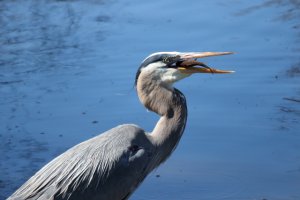
Although I usually use a 1D X and 600/4L IS II for birds, frequently with a 1.4x TC, that's not always the case as you can see below with a shot at 200mm on APS-C. For this shot, I approached the heron very slowly over a period of several minutes until I was close enough to get the shot without too much cropping.. Fast shutter speed, ISO as low as feasible (I prefer not to go much higher than ISO 800 on APS-C).

"Down the Hatch"
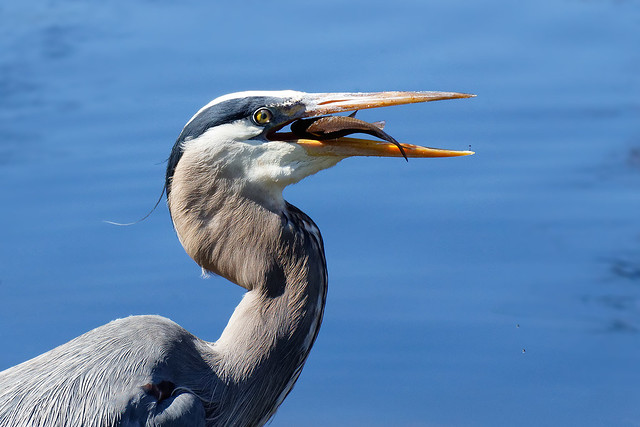
EOS M2, EF-M 55-200mm f/4.5-6.3 IS STM @ 200mm, 1/1600 s, f/6.3, ISO 800

Below is the original version, no edits to the RAW file, just converted with DPP using the Standard picture style and at the same pixel dimensions as the image above (although you can click the pic above for a larger image). Hopefully that illustrates the importance of post-processing.

 

Attachments

  • GBH original.JPG
    GBH original.JPG
    229.7 KB · Views: 853
Upvote 0
neuroanatomist said:
The Sigma/Tamron 150-600mm zooms are an option, although there's probably little difference between those at the long end and cropping a shot with the Canon 100-400 II, due to the better optical performance of the latter.

I agree wholeheartedly with the rest of your post - very good advice. But, the comment about the Sigma/Tamrons vs the 100-400mm II may apply to some copies of the lenses but not all, the best copies are very good. My Sigma 150-600mm II is slightly better at 400mm than either of my 100-400mm IIs and as good at 600mm as my 300mm f/2.8 II + 2xTC III. The Tamron 150-600mm I sold was not nearly as good - the opposite of lenstip's conclusions. Test sites usually test one copy only and base their conclusions on that - the antithesis of good science where you do multiple experiments rather than take one isolated point.
 
Upvote 0
picturefan said:
AlanF said:
picturefan said:
Otus said:
By the way Alan, the greenfinch looks a lot like a corn bunting. Are you sure its a green finch? :)

Not sure either, could be a grey-bunting (?) (Emberiza calandra)...
But more of interest (at the moment ;) ) is it sharpened in post or out of cam?

You won't get sharp bird photos at ISO 3200 and cropping. Same for FF?
I do absolutely minimal sharpening in post processing of RAW. I used USM of 0.9 px at 100%, which is standard for my work flow. More sharpening can look unnatural unless you really know what you are doing. That´s for sure...
Sorry for digging deeper: how close were the birds on your examples approx.?

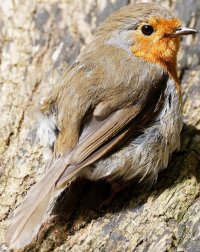
I always post 100% crops (1px posted = 1 px in original) with the exif data included. Download them and and you can see how large or small they are. For example, the corn bunting is occupying only about 1000x1000 px^2 out of a 8688x5792 (50mpx) sensor. That is 2% of the area, which still provides a worthwhile print in my album. The robin was the closest, at 2100x1700, which is about 7% of the sensor area or roughly 1/4 of the height or width (it's at 400mm on the Sigma 150-600mm C on the 5DS R).
 

Attachments

  • Robin_400mm.jpg
    Robin_400mm.jpg
    1.5 MB · Views: 174
Upvote 0
AlanF said:
picturefan said:
AlanF said:
picturefan said:
Otus said:
By the way Alan, the greenfinch looks a lot like a corn bunting. Are you sure its a green finch? :)

Not sure either, could be a grey-bunting (?) (Emberiza calandra)...
But more of interest (at the moment ;) ) is it sharpened in post or out of cam?


You won't get sharp bird photos at ISO 3200 and cropping. Same for FF?
I do absolutely minimal sharpening in post processing of RAW. I used USM of 0.9 px at 100%, which is standard for my work flow. More sharpening can look unnatural unless you really know what you are doing. That´s for sure...
Sorry for digging deeper: how close were the birds on your examples approx.?

I always post 100% crops (1px posted = 1 px in original) with the exif data included. Download them and and you can see how large or small they are. For example, the corn bunting is occupying only about 1000x1000 px^2 out of a 8688x5792 (50mpx) sensor. That is 2% of the area, which still provides a worthwhile print in my album. The robin was the closest, at 2100x1700, which is about 7% of the sensor area or roughly 1/4 of the height or width (it's at 400mm on the Sigma 150-600mm C on the 5DS R).

And how much is that in USD, horse power or knots?? Haha... ::)

Come on, you see I have absolutely no clue how to translate from a count size pixel into linear dimension in metres. Didactics usually start with an example...
 
Upvote 0
1. Go back to the post where I posted 3 photos of birds.
2. Click on each one til it goes to full size.
3. Download each of them.
4. Open in a program such as Preview on a Mac.
5. Click on "Show inspector" or the equivalent on a PC.
6. Go to EXIF.
7. Read off the value it has for "Distance"
 
Upvote 0
AlanF said:
1. Go back to the post where I posted 3 photos of birds.
2. Click on each one til it goes to full size.
3. Download each of them.
4. Open in a program such as Preview on a Mac.
5. Click on "Show inspector" or the equivalent on a PC.
6. Go to EXIF.
7. Read off the value it has for "Distance"

Your talking about focal lenght, aren`t you? I´m asking about the distance between you and your target. How should exif know?
Reason: on closer distances there are no softness-issues (because there is no enlargement needed), that´s why I´m asking...
 
Upvote 0
picturefan said:
AlanF said:
EXIF has the subject distance recorded from the AF.

I see, thank you. Seems exif knows all :)

Yours do, mine not. Checked the exif of my pics, they never show distance information :(

If you use "exiftool", there are two tags: "Focus Distance Upper" and "Focus Distance Lower".
exiftool is a 'perl' module, but is also available as a standalone program on Windows.
 
Upvote 0
AlanF said:
EXIF has the subject distance recorded from the AF.

AlanF said:
Adobe Photoshop also reads subject distance in File -> File Info -> Exif Properties

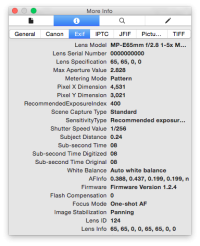
What is your impression of the reliability of that value? Are you certain it comes from the AF data? I'm not sure that's true – here's a distance value for a processed jpg image (0.24 in Apple's Preview, Photoshop reports '6/25' as the value for that field, and exitfool reports 0.24 m). As you can tell from the lens, it's clearly not coming from the AF information. Moreover, while there is a Subject Distance value reported for the processed jpg image, the Subject Distance field is completely lacking from the corresponding RAW file EXIF data when viewed with any of the three methods above.

(As a side note, 'Image Stabilization' is noted as 'panning' yet like AF, that capability is lacking in the lens used...leading to yet another question about the reliability of certain EXIF data fields.)
 

Attachments

  • SubjectDistance.png
    SubjectDistance.png
    73 KB · Views: 933
Upvote 0
It seemed accurate enough from what I recalled - I didn't measure the distances with a tape measure but the distances were consistent with what I would have guessed. FoCal also records distances to the target and they appear spot on as I do measure them. What information does FoCal use?

PS I seem to recall the data become less reproducible for very long distances, as you would expect as depth of field increases.

PPS DxO, which I use as RAW converter, appears to pull out the EXIF data from RAW.

PPPS The on-line exif viewer http://regex.info/exif.cgi pulls out even more data, e.g. on the cornbunting:

Focus: At 12m, with a depth of field of about 16cm, (from about 7.8cm before the focus point to about 7.9cm after)

And, it pulls out focus distances from .CR2 files (on my 5DIII but not on my 5DS as it accepts files only up to 40 Mb).

So, Neuro, the subject distance does really appear to be in EXIF.
 
Upvote 0
AlanF said:
FoCal also records distances to the target and they appear spot on as I do measure them. What information does FoCal use?

FoCal knows the width of the target. I believe it uses that information along with the focal length to calculate the distance.

neuroanatomist said:
What is your impression of the reliability of that value? Are you certain it comes from the AF data? I'm not sure that's true – here's a distance value for a processed jpg image (0.24 in Apple's Preview, Photoshop reports '6/25' as the value for that field, and exitfool reports 0.24 m).

Exit-fool ?? :o

I looked at a couple of (RAW) images that I recently took, where I have a good idea of the subject distance. TL;DR is that the FocalDistanceLower/FocalDistanceUpper is not (always) reliable.
I have a photo where I'm between 10 and 15meters from the subject, and FDL/FDU is reported as 31.93m / 42.34m (IrfanView reported 12.34m).

I checked with IrfanView and it returns weird numbers such as 0 (zero), 12.34 or 655.35 (0xFFFF) for 'Subject Distance' - all of which are definitely wrong.
 
Upvote 0
kaihp said:
AlanF said:
FoCal also records distances to the target and they appear spot on as I do measure them. What information does FoCal use?

FoCal knows the width of the target. I believe it uses that information along with the focal length to calculate the distance.

FoCal states: "Standard Target – Vector PDF (can be scaled to any size and keep highest quality)"

So FoCal doesn't specify size of target and therefore cannot use target size in its calculations. It also sells two different sizes of printed target.
 
Upvote 0
Hi Alan.
I'm fairly certain that the last time I used FoCal pro there was a field to enter the width of non standard targets so that it could work out distance, which always seems quite inaccurate as it reports distances longer than the room I'm working in! Wondering if that is a crop camera issue, I'd have thought that as FoCal identifies the camera and lens accurately by model (and manufacturer) it should take crop in to account automatically.
Target measured to within 0.25mm or less, toolmaker OCD at work.

Cheers, Graham.

AlanF said:
kaihp said:
AlanF said:
FoCal also records distances to the target and they appear spot on as I do measure them. What information does FoCal use?

FoCal knows the width of the target. I believe it uses that information along with the focal length to calculate the distance.

FoCal states: "Standard Target – Vector PDF (can be scaled to any size and keep highest quality)"

So FoCal doesn't specify size of target and therefore cannot use target size in its calculations. It also sells two different sizes of printed target.
 
Upvote 0
AlanF said:
kaihp said:
AlanF said:
FoCal also records distances to the target and they appear spot on as I do measure them. What information does FoCal use?

FoCal knows the width of the target. I believe it uses that information along with the focal length to calculate the distance.

FoCal states: "Standard Target – Vector PDF (can be scaled to any size and keep highest quality)"

So FoCal doesn't specify size of target and therefore cannot use target size in its calculations. It also sells two different sizes of printed target.

You did see that place in the Settings where you are supposed to type in the width of the target, right?
 
Upvote 0
kaihp said:
AlanF said:
FoCal also records distances to the target and they appear spot on as I do measure them. What information does FoCal use?

FoCal knows the width of the target. I believe it uses that information along with the focal length to calculate the distance.

neuroanatomist said:
What is your impression of the reliability of that value? Are you certain it comes from the AF data? I'm not sure that's true – here's a distance value for a processed jpg image (0.24 in Apple's Preview, Photoshop reports '6/25' as the value for that field, and exitfool reports 0.24 m).

Exit-fool ?? :o

I looked at a couple of (RAW) images that I recently took, where I have a good idea of the subject distance. TL;DR is that the FocalDistanceLower/FocalDistanceUpper is not (always) reliable.
I have a photo where I'm between 10 and 15meters from the subject, and FDL/FDU is reported as 31.93m / 42.34m (IrfanView reported 12.34m).

LOL at my typo. :)

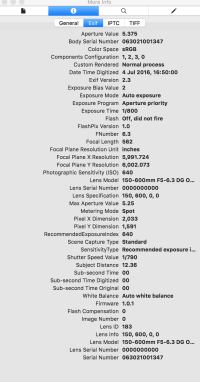
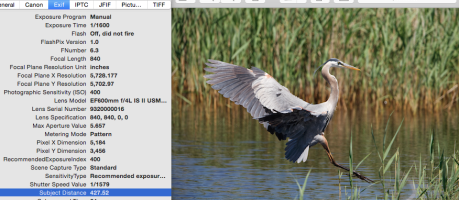
My impression is similar to yours - the subject distance is not reliably accurate. Sometimes it's not horrible – shots with the MP-E 65mm are generally reporting <0.25m, a shot of a sheet of paper (US letter, so the size is known) reports 1.7 m in the EXIF but was shot at 1.4m distance based on geometry. Other times, it's pretty far off – for example, the GBH shot below reports a distance of 427 m, which if correct means the heron is about the size of a pteranodon. The shot was actually at ~70 m.
 

Attachments

  • Distance.png
    Distance.png
    520 KB · Views: 140
Upvote 0
Photoshop>File>File info does not seem to give me distance info, so I downloaded Exiftool. Exiftool gives me Focus distance Upper and Lower for CR2 files and Approximate focus distance for the resulting jpg files after processing the CR2 file with Photoshop CC.

For the picture below I get the following results:

CR2:
Focus distance upper: 3.15 m
Focus distance lower: 2.85 m

JPG:
Approximate focus distance: 2.95 m

The pictures is taken from my garden hide, so I just went and measured the distance from the branch to the sensor: I got 2.94 m. Given that I focussed on the eye of the greenfinch which is a bit further out than the branch, I'd say the approximate focus distance is bang on, at least for this picture.

Mario

Groenling_1DXII011424.jpg
 
Upvote 0
I took last month a series of shots with the 5DS R and the 100-400mm II, 300 f2.8 II, Sigma 150-600mm, plus extenders, all from the same spot on a tripod of a chart for optimising AF. The distance, I recall was 19.7 m (metres, Neuro, not miles). There was a spread of about ± 10%, but each lens was incredibly consistent at different focal lengths and with or without extenders. I also did repeat runs over the course of a week or two and the distances were identical. As I mentioned earlier, the data are reproducible over shorter distances but for far they are not good because of huge DoF. Fortunately, I kept the DxO output for the shots that were spot on sharp.
(Note how good my AFMAs are with liveview absolutely identical).

Distances in metres, focal lengths in mm

Canon 100-400mm II
mm m
Canon 400 18.77
Canon 560 18.79

Canon 300mm f/2.8
Canon 300 21.47
Canon 420 21.5
Canon 600 21.52
Canon 600 21.52 (Live view)

Sigma 150-600mm C
Sigma 300 18.03
Sigma 400 18.03
Sigma 500 18.03
Sigma 600 18.03 (Live view)
Sigma 600 18.03
Sigma 840 18.05
 
Upvote 0