• The Canon Rumors Forum has officially been shut down as of July 10, 2026.

    All data will be deleted on September 16, 2026.

    the ad free experience will return by July 17, 2026.

R5 Communication function OFF Service

I am not sure if this had been discussed anywhere, if so, moderator please delete. So I went to the Canon R5 page and noticed this service.


1. I have not heard anything about it before.
2. I was wandering what you gain by disabling the wireless communication function of the R5 and the other cameras? Battery life? If so why not put it in Airplane Mode.

If anyone understands the merit of doing this, especially for a fee, can you please let me know.

BELOW is a paste from the website.

We have released a new upgrade service for the EOS 5D Mark IV, EOS R5 and the EOS-1D X Mark II. This upgrade disables the following menus from the display:

Wireless communication function tab:
  1. Wi-Fi/Bluetooth connection
    • Connect to smartphone
    • Remote control (EOS Utility)
    • Transfer images to FTP server
    • Upload to Web service
    • Connection to Wireless Remote
  2. Airplane mode
  3. Wi-Fi settings
  4. Bluetooth settings
  5. Nickname
  6. GPS device settings
  7. Image transfer
  8. Resetting communication settings
  9. Battery charging order (camera priority/WFT priority) 1
  10. WFT setting 1
*1 Menu displays only when Battery Grip WFT-R10 is attached.
Please note:

  1. Wi-Fi/Bluetooth hardware are built-in and are disabled by the firmware2.
  2. 2 Although there is some robustness against firmware tampering, it does not ensure complete robustness or invalidation.
  3. The communication function OFF specification can be confirmed on the menu screen. With the communication function OFF specification, the ‘Wireless communication function’ tab is hidden, and network/Bluetooth and GPS function settings cannot be selected.
  4. The communication function OFF specification is possible with Firmware Version 1.2.0. Cameras with the communication function OFF specification cannot be changed to a previous firmware version.
  5. With the communication function OFF specification, it is possible to assign "Wi-Fi/Bluetooth connection" to some buttons when setting Custom Controls, but please note that the screen display does not change even if you press the buttons.
Pricing

Model
Price*​
EOS 5D Mark IV
$120.00​
EOS R5
$120.00​
EOS-1D X Mark III
$120.00​
*Tax and shipping fees are NOT included
*All pricing is subject to change


Thank you,
Customer Support Operations
Canon U.S.A., Inc.
Contact Information for Inquiries
Canon Customer Support Center
Phone:1-800-OK-CANON (toll free)
1-800-652-2666
For additional support options: usa.canon.com/support

Deal of the Day: Litepanels Astra 6X Bi-Color LED Panel, with V Mount Battery Bracket $699 (Reg $1199)

Adorama has the Litepanels Astra 6X Bi-Color LED Panel, with V Mount Battery Bracket as their Deal of the Day for $699 (Reg $1199)
Key Features

Bright, color-accurate white light
Automatically flicker-free at any frame rate
Active & Passive cooling modes
Fully adjustable Daylight and Tungsten color temperature
High CRI output
AC and optional battery power
Fixture Type: Light Panel
Kit Style: Adorama 1 Light Battery Bracket Kit
Panel Size: 16″ x 17″
Power Source: AC/DC
Battery Connection: V Mount Included
Color Temperature: Bi-Color
Color Temperature Range: 3200-5600K

Litepanels Astra 6X Bi-Color LED Panel, with V Mount Battery Bracket $699 (Reg $1199)

Continue reading...

Venus Optics announces the Laowa RF 33mm f/0.95 (but it’s APS-C)

Anhui China, May 03 , 2021 – Venus Optics, the manufacturer specialized in making unique camera lenses, is proud to introduce the Laowa ‘Argus’ 33mm f/0.95 CF APO, a magnificent f/0.95 prime lens for APS-C cameras.
The ‘Argus’ name was originally from Greek mythology and was the name of a vigilant guardian with a hundred eyes and an “all-seeing” sight. The name represents the ultra-bright f/0.95 aperture of the lenses and the exceptional image quality they deliver.
The 35mm f/0.95 is the first released lens of the much anticipated Argus line. Featuring the ultra-fast f/0.95 aperture with APO design, the lens offers photographers and videographers a classic focal length for everyday shooting and the versatility to shoot at difficult lighting conditions. The lens delivers exception image quality at wide-open and suppresses the chromatic aberration to the minimal. Couple with the 35mm (1.15 feet) minimum focus distance, a buttery smooth and exquisite bokeh rendering can easily...

Continue reading...

Canon RF 2x Extender - anyone used one?

The RF 1.4xTC works well on my 100-500mm and R5 with excellent AF and after some sharpening at 700mm it's pretty close to the RF 800mm in resolution and IQ. I am intrigued as to how well the RF 2x performs in terms of AF and IQ on the 100-500mm in particular. It's so expensive, that it would cost not much more to buy an 800mm RF. But, if the IQ etc are good, it would be tempting to have one in my kit for the occasional 1000mm f/14 shot. I'd be grateful for any first hand experience or for pointers to any reviews (TDP has image quality with it only on the 800mm).
  • Like
Reactions: 1 user

Is a Canon RF 60mm f/1.0L USM on the way? [CR1]

Canon Watch is reporting that a Canon RF 60mm f/1.0L USM is possibly on the way. This lens does not appear on my RF lens roadmap, nor have we seen any patents for such an optical formula yet.
Is it possible? Sure, why not? If you believe your mount is the best, you need to flex those muscles every now and then.
While it is close to the RF 50mm f/1.2L USM in speed and focal length, I imagine an RF 60mm f/1.0L USM would provide a very unique look to photos. Throw in defocus smoothing and you could have something special.
For now, this is a [CR1] rating, but I will do some digging to figure out the validity of this rumor.

Continue reading...

Canon talks EOS R3, and confirms that it is not the flagship mirrorless

PhotoWebExpo has posted an interview with the Head of Product and Consumer Expertise at Canon Russia, while most of it is what you’d expect in a Canon interview, there are some good nuggets of information.
The original interview is in Russian, so obviously I have used Google Translate here. Below are a few answers that are probably worth noting.
Which type of photographers is the Canon EOS R3 intended for?
Canon is aiming this camera at professionals and advanced amateurs. The Canon EOS R3 is not intended to replace the Canon EOS-1D X Mark III.
The camera will be intended for wildlife, sports, racing, and photojournalism.
The camera will be smaller than the EOS-1D X Mark III as well.
Why an EOS R3 and not an EOS R1?
Canon says this camera is a new line for the EOS R system. It will be slotted between the...

Continue reading...


  • Like
Reactions: 1 user

R5 Image Stabilisation Issue

I'm still learning then R5 and the only significant issue I have is that when stabilisation is enabled on the attached lens, you can't switch it off via a customised button on the body. I have configured my 1DXII and 5DIV bodies, so that holding down the DOF button disables stabilisation. For instance, this enables me to track a distant bird with the benefits of stabilisation and when that subject gets closer, or another close subject appears, I can disable the stabilisation by depressing the conveniently placed DOF button. It took a bit of getting used to but is far more seamless than switching off IS on the lens itself, particularly if its a big white lens.

Given that the R5 appears to me to be the mirrorless equivalent of the D5, not being able to configure the camera body in the same fashion is both disappointing and frustrating. Furthermore, I would also like to be able to disable the IBIS within the body for stills. I'm not aware of any technical issues that would prevent both these abilities to be implemented by firmware.

Who is missing a smaller SPOT-AF-Point on The R5?

In the middle of our spring-birding-season the more I am missing a smaller Spot-AF-Point on my R5.
In a lot of cases the birds, I want to shoot are far away and the existing Spot-AF-point is to large to nail the eye.
Using my older EF-bodies, the smaller Spot-point is often more nailing sharpness on the eye.
It gets better, if I stop down the 600mm lens to f8 to get a larger depth of sharpness, but then noise gets a problem.

Do you have the same experience? Would you like to see an R3 with an smaller Spot AF?

Using Fast Manual Focus Lenses on the 5D4

Hello, all - new member here with a question...
Has anyone had first-hand experience with an aftermarket focusing screen for the 5D4 that is optimized for fast lenses - especially, fast manual focus lenses?
I realize D-SLRs typically do not have the same focusing assurance as was afforded by the viewfinders in our film SLR's, in terms of a really accurate contrast between what's in precise focus and what isn't when using lenses of f/2 and faster. I also understand changing focusing screen to one optimized for such lenses is possible on the 6D and was also possible in the 5-series, at least up to the 5D2.
The lens that prompted this question is my new Zeiss Milvus 135mm f/2, so not only a fast lens, but at 135mm, d-o-f can be excrutiatingly thin at wide aperture settings. The 5D4 reliably confirms with a chirp that focus is accurate where I have positioned a single sensor, but it is a crapshoot as to how deep the d-o-f really is, beyond that one detail. For a lot of my shooting, Live View with magnification is not a practical alternative...
The conundrum is that I see in Canon's data that the 5D4 uses a fixed screen, yet there is a website that actually shows four different focusing screens that they produce, on a page devoted to the 5D4.
Am I missing something? Or do I need to hang a 6D (with specialized viewing screen) on this bulky but beautiful monster for less angst while focusing.
Many thanks!

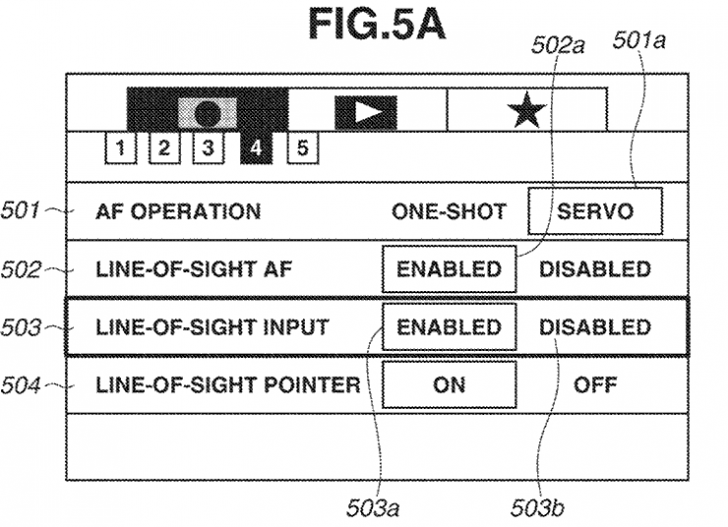
Patent: Canon shows off some information about the eye-controlled AF point selection

The Canon EOS R3 will come with eye-controlled autofocus, made most famous by the film camera, the EOS 3. There have likely been a few advancements in technology over the last few decades, but there are some similarities in how the system will be calibrated.
The USPTO patent US 2021/0124239
The first patent shows the menu system that will likely be similar to what we see in the Canon EOS R3. It looks like there will be a lot of customization options to improve the experience.
eye-af-settings-728x527.png
The USPTO patent US 2021/0125375
The second patent shows off how Canon plans to set up calibration for eye-AF on the Canon EOS R3. This calibration is similar to the way the Canon EOS-3 worked, you will follow a moving target around the viewfinder. Canon has likely worked out a lot...

Continue reading...

Patent: Canon RF 130mm f/1.4L USM and other fast primes

Keith at Northlight has uncovered a patent showing optical formulas for three fast prime lenses, most notably a Canon RF 130mm f/1.4L USM. On my roadmap for Canon, we do have an RF 135mm f/1.4L USM listed, so this patent could potentially be related.
Canon RF 130mm f/1.4L USM

Focal length: 131.00mm
F-number: 1.41
Angle of view: 9.38°
Image height: 21.64mm
Lens length: 182.28mm
Backfocus: 13.87mm

The following optical design has a really strange backfocus distance of 54,12mm according to the patent literature.
Canon 135mm f/2L USM

Focal length: 133.50mm
F-number: 2.06
Angle of view: 9.21°
Image height: 21.64mm
Lens length: 155.12mm
Backfocus: 54.12mm

The following optical design also has an unusual backfocus distance.
Canon 24mm f/1.4L USM

Focal length...

Continue reading...
  • Wow
  • Like
Reactions: 1 users

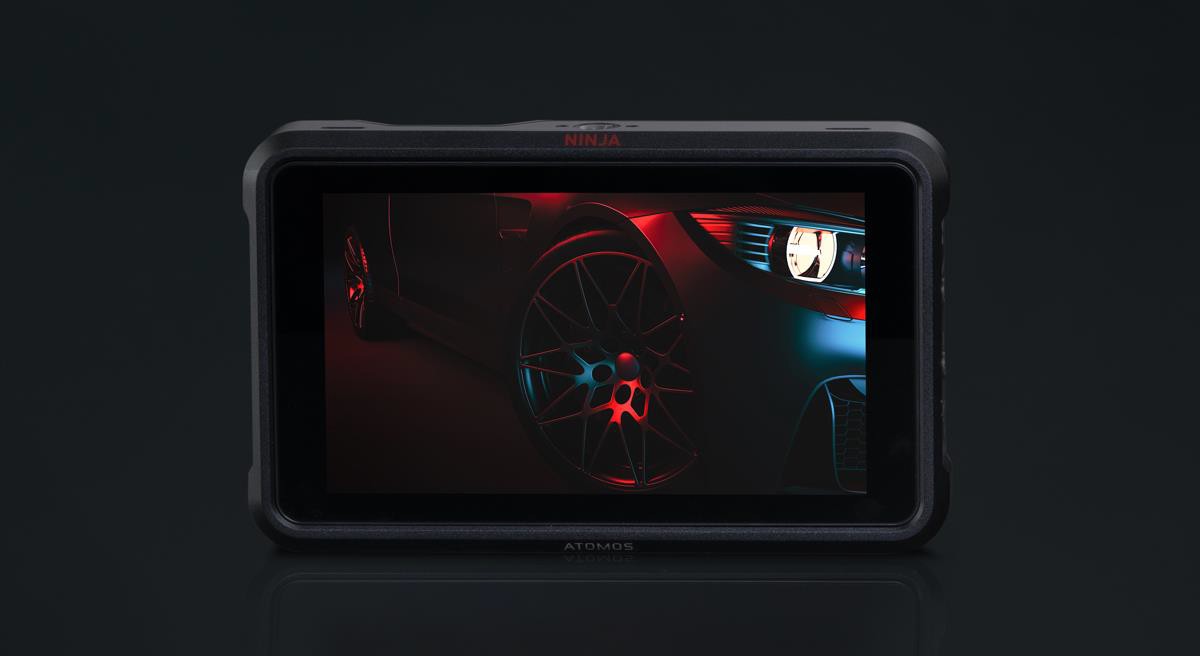
Atomos brings 8K 30p ProRes RAW to the Canon EOS R5 with the Ninja V+

Melbourne, Australia – 28th April 2021 – Atomos is thrilled to announce that it is expanding the Ninja family, with two exciting new Ninja products and a major update for Ninja V!
Ninja V receives the option for H.265 codec upgrade, Ninja V+ – is built for Apple ProRes RAW 8K productions, and Ninja Stream – 4Kp60 HDR for a high-quality social distancing production environment.
The Ninja V receives H.265 (HEVC)
The original Ninja V, launched in 2018, remains the most popular Atomos product and receives the ability to add the H.265 (HEVC) codec. The 5” 1000nit 10-stop HDR monitor allows users to accurately monitor and record from either HDMI or SDI. Atomos continues to expand Apple ProRes RAW support on all partner cameras over HDMI and SDI. The Ninja V will continue to receive updates for cameras and additional functionality via AtomX modules whilst remaining at the price of $595.
word-image.jpeg

The popular...

Continue reading...

A firmware update to address the IBIS issue is coming, no date yet [CR3]

There have now been multiple reports about the IBIS shift/tilt on the Canon EOS R5 and Canon EOS R6, so I think it’s safe to say it’s more than a “phenomenon”.
I have been told that Canon is aware of the issue and that there will be a firmware update to correct the behavior. The source doesn’t know what the timeline for the update is, but I imagine it will come when it’s done and not a moment sooner!
More to come…

Continue reading...


  • Like
Reactions: 2 users

Canon or Nissin macro ringflash ?

Just in case somebody hesitates.
I own the Nissin MF 18 ringflash, in a Canon "dedicated" version. I believed I could use it on any more or less recent Canon DSLR or MILC. I should have looked for compatibility on the Nissin website...
This flash doesn't work on many Canon cameras, for instance on the latest models, with the exception of the EOS R, it's not even compatible with the EOS 5D IV.
Lesson learnt: stick with original accessories, if you, like me, hate expensive surprises.
  • Like
Reactions: 1 user

R5 Self-Timer Continuous AF Bug - anyone else?

I was just outside trying to take self-portraits of myself and experienced a bug with my R5. In Servo, Continuous AF mode with Self-Timer Enabled, the camera will not track my face while the timer is counting down. Instead, it will hold single-point focus from when I initially press the shutter, only. This means all my self-portraits are blurry when I step back. Right as it takes the photo, the LCD screen will show the locked blue focus square quickly flash to a white face tracking box over my face, but it will not refocus.

Would anyone else check their R5 to see if this issue occurs for them? My firmware version is the most recent, 1.3.1. I just called Canon and reported it. It'll be forwarded to their engineers.

Thanks!

R5 Self-Timer Continuous AF Bug - anyone else?

**Posted in wrong section, and can't delete**

I was just outside trying to take self-portraits of myself and experienced a bug with my R5. In Servo, Continuous AF mode with Self-Timer Enabled, the camera will not track my face while the timer is counting down. Instead, it will hold single-point focus from when I initially press the shutter, only. This means all my self-portraits are blurry when I step back. Right as it takes the photo, the LCD screen will show the locked blue focus square quickly flash to a white face tracking box over my face, but it will not refocus.

Would anyone else check their R5 to see if this issue occurs for them? My firmware version is the most recent, 1.3.1. I just called Canon and reported it. It'll be forwarded to their engineers.

Thanks!

The 'Without a Camera Limbo' (just sold my 5D3) to buy a ______.

Never been without a ILC since 1999. Feels weird. I'm still on board with film with my EOS 3 so there's that. I just bit the bullet and sold my 5D3 body... was an early adopter and it's been my main rig since late 2012. Photography has taken a back seat to my other interests and I've become a one body shooter, it works. I guess a zero body has to work until I make a decision...

Not sure what I'll pick up but it will be EOS R and using my EF glass adapted for the time being. I could go anywhere from an RP, an R or an R6. The R5 is not for me, I've ruled that out. Stills only here, probably should have been a Leica guy. I've got a couple weeks to figure it out, fun eh?

I'm mostly shooting macro on rails with the 100L, abstract with the 135L and landscape at all focal lengths (16-540mm) Not certain yet if I will go the control ring adapter or standard route. I am by no means a MP whore and I have seen what some of you here can do with the R6 (birding for one) So there's that. I do know I love the joystick however did come to appreciate the touchscreen and dragging thing on the M5 for the brief flirtation I had a few years back.

Change, time to embrace it.

Are you experiencing this phenomenon with IBIS on your Canon EOS R5?

When it comes to bugs with cameras and lenses, I tend to err on the side of caution posting about them. Most that are sent to me tend to be a user or environmental issue. This one, however, I can make happen on my own Canon EOS R5.
I’m not sure that this has had any real-world negative effect on my shooting, but we all shoot differently, and it could be a bigger deal for others.
Canon Rumors reader juanmaasecas sent me the above example of the issue with this explanation.

Some weeks ago I found what I think is an annoying bug with the IBIS in the Canon R5 (some users also experience it with the R6).
When the ibis is set to “always ON”, the sensor twists after the first picture is taken, producing a blurred picture. If you keep pressing the shutter half (while in continuous autofocus or just In single) and then take more pictures, the rest are just fine.
I went to Canon repair center/showcase here...

Continue reading...

Canon Inc. releases their Q1 2021 financials

Canon Inc. has released its financials for Q1 of 2021. Revenue and sales have been very good compared to the same time last year. Canon has even raised sales and revenue projections for their imagine division.
Check out the official Canon Inc Q1 2021 Financial Information

Presentation Material
Results
Supplementary Data

Canon Imaging Presentation
As for cameras, even amid continued restrictions on people’s movement, demand for cameras remains solid, supported by the need for high-quality visual expression. Based on this, we still expect the 2021 camera market to be up slightly or 5.8 million units.
In the first quarter, revenue was significantly higher...

Continue reading...

7DII - problem with firmware update

I am trying to update the firmware on my 7DII from 1.0.4 to 1.1.3.
As in the instructions, I have a fresh battery in the camera, the camera is off when I insert the SD card (with .FIR file on it) and it is set to 'P' mode (also tried 'M' mode).
I go to the Spanner, menu 5 and highlight 'Firmware ver 1.0.4' and press 'OK' twice.
'Current firmware is 1.0.4. Update Firmware - press 'OK'
It then comes up with 'Firmware Update Program' screen and the message 'Update file cannot be found. Please check the memory card and reload the battery and try again'.

I have tried 2 different 32GB cards and an 8GB card and all give the same error.
I have formatted all cards before copying the '.FIR' file to them.

This is driving me nuts - any suggestions on what to do? I can find nothing about this on the interweb.

The reason I started all this was to check the continuous shooting rate because it does not seem to be hitting the 10fps rate it should be getting, but the continuous shooting menu item is not there for some reason. The camera works fine, but I just want to check it.

Your top 10 ranked overall favorite EF lenses now that the final roster is available?

So EF lens releases have dramatically slowed if not stopped. It appears we have may seen the final roster of EF lenses.

Assuming that is the case, what are your personal top 10 (or top 3, top 5, etc) EF lenses you've had experience with?

Here are mine for full frame, ranked in order with a brief explanation - note again this is overall favorites, meaning taking all aspects of the lens into account (not just image quality). I mostly shoot people and places.

1. EF 50mm f/1.2L USM - Probably a controversial choice, but the combination of normal focal length, relatively compact size/weight, fast AF, and amazing rendering put this at #1.
2. EF 70-200mm f/2.8L IS II USM - A versatile workhorse with stunning sharpness, rendering, accurate AF, its worth its weight in gold. My best pic of all time was taken with this.
3. EF 24-70mm f/2.8L II USM - Another flexible mainstay that provides sharp, wonderful looking photos in the most frequently used range.
4. EF 16-35mm f/4L IS USM - For those that don't always want to use a tripod, perhaps the best overall landscape lens Canon offers.
5. EF 35mm f/2 IS USM - While not as fast as its L counterpart, it's almost as fast and much more compact, light, and discreet - my fav street photography lens
6. EF 85mm f/1.2L II USM - While this lens has perhaps the best rendering, the focal length is not as versatile as the 50mm f/1.2L, slow AF, and much more fragile
7. EF 70-300mm f/4-5.6L IS USM - The relatively compact travel zoom with excellent rendering which can double as a wildlife or outdoor sports lens
8. EF 135mm f/2L USM - Sharp, fast, accurate AF, nice rendering and compression. But 135mm is long and without IS requires fast shutter speeds, combined limiting its use to studio/outdoors daytime or tripod often
9. EF 8-15mm f/4L Fisheye USM - Fisheyes have limited usefulness but can produce impressive results in select cases; this one offers special creative possibilities with its circular 8mm; but lower on the list due to limited opportunities to use productively
10. EF 24mm f/2.8 IS USM - Perhaps another oddball to end the list, but this is a great long hike landscape lens due to its small size and light weight plus classic 24mm landscape focal length. When you don't want to carry around the nearly 3x heavier and 2x as long 16-35mm f/4L, this is a great alternative.

So what are your personal top EF lenses from the final roster?
  • Like
Reactions: 1 users

MY new R5 - both cards format but camera recognizes only card 2

Late to the party and a little overwhelmed by the R5. My 1DX2 had a button to select which card and the R5 menus seem to not even mention card selection but I found it using the Q button. I have formatted both of my new cards apparently successfully but Card 2 (Sandisk 64GB SDXC -I) is the only one showing in the Q menu. The other card (1) is a Sandisk Extreme Pro CFexp Type B 128GB.

With only a CFe installed the camera says No Card 2 in camera recording not possible. The Q menu does display card 1 and 2 when installed but allows no access to 1 and "Standard" is displayed and the other three choices are greyed out.

I'm stumped as to what to try/do.

Jack

Filter

Forum statistics

Threads
37,480
Messages
975,426
Members
24,816
Latest member
GLBDD

Gallery statistics

Categories
1
Albums
29
Uploaded media
372
Embedded media
1
Comments
25
Disk usage
1 GB